Architecture  

LaminDB is a distributed data management system like git that can be run or hosted anywhere. It just needs a SQLite or Postgres database and at least one storage location (file system, S3, GCP, Hugging Face, …).
Creating a local LaminDB instance after pip install lamindb is as easy as:
lamin init
import lamindb as ln
ln.setup.init()
library(laminr)
lamin_init()
Or you connect to an existing remote database:
lamin connect --here account/instance # --here localizes your connection to the current directory
import lamindb as ln
ln.connect("account/instance")
library(laminr)
ln <- import_module("lamindb")
ln <- ln$connect("account/instance")
For more configuration, see Install & setup. LaminDB instances work standalone but can optionally be managed by LaminHub.
On a high level, LaminDB’s architecture has the following properties:
→ docs
zero lock-in → open source, using open standards (metadata in SQLite/Postgres, data in
parquet,zarr, etc.)scalable → hit storage & database directly through your
pydataor R stack, no REST API involvedsimple →
pip install lamindborinstall.packages('laminr')· no Docker required, no separate backendunified access → local, S3, GCP, etc. · Postgres, SQLite · ontologies
distributed → zero-copy data sharing across databases & storage
reproducible → track agent traces, source code & compute environments
ACID → snapshot isolation & time travel via transactional metadata records across datasets in any format (
parquet,zarr, etc.)idempotent → re-run logic without worries about duplications or overwrites
decoupled compute → run your favorite engine (Polars, DuckDB, data loaders, …) with all its benefits
integrations → bio ontologies, git, nextflow, vitessce, redun, and more
extensible → create custom plug-ins based on the Django ORM, the basis for LaminDB’s registries
Who?
Scientists and engineers at leading research institutions and biotech companies, including:
Industry → Pfizer, Altos Labs, RefinedScience, Ensocell Therapeutics, …
Academia & Research → scverse, DZNE (National Research Center for Neuro-Degenerative Diseases), Helmholtz Munich (National Research Center for Environmental Health), …
Research Hospitals → Global Immunological Swarm Learning Network: Harvard, MIT, Stanford, ETH Zürich, Charité, U Bonn, Mount Sinai, …
From personal research projects to pharma-scale deployments managing petabytes of data across:
entities |
OOMs |
|---|---|
observations & datasets |
10¹² & 10⁶ |
runs & transforms |
10⁹ & 10⁵ |
proteins & genes |
10⁹ & 10⁶ |
biosamples & species |
10⁵ & 10² |
… |
… |
UI, permissions, audit logs, hosting? → LaminHub
LaminHub is a collaboration hub built on LaminDB similar to how GitHub is built on git:
permissions → role-based, fine-grained access management for humans, bots & teams
audit logs → full traceability for compliance
single sign-on → social logins, Okta, Ping, and other providers
secure → SOC2 certified, monitoring ISO27001 & HIPAA compliance
scale → transparently manage many databases and storage locations
Architecture:
zero lock-in → LaminDB ensures data remains accessible even if you cancel LaminHub
permissions on the Postgres & storage layer → no need for an intermediate web service
TRE (Trusted Research Environment) → manage sensitive data from e.g. the UK Biobank
auto-generated REST API → optional REST interface for JavaScript-based web applications
UI:
lineage → interactive graphs for records, datasets, notebooks & pipelines
catalog → browse, search & query records and datasets
notebooks, workflows, runs → visualize & launch executions
versioning → manage data & code revisions
LIMS & ELN → records & notes integrated with ontologies
schemas, features, labels → manage data models
Give it a try by exploring public databases at lamin.ai/explore. It’s free and no account is required.
For private data & commercial usage, see: lamin.ai/pricing.
Quickstart
To install the Python package with recommended dependencies, use:
pip install lamindb
Install with minimal dependencies.
The lamindb package adds data-science related dependencies through the [full] extra, see here.
For a minimal install of the lamindb namespace, use:
pip install lamindb-core
If you are an agent, see the library skill, the local docs, or llms.txt.
Query databases
You can explore public databases here. To query laminlabs/cellxgene, run:
import lamindb as ln

db = ln.DB("laminlabs/cellxgene")  # a database object for queries
library(laminr)
ln <- import_module("lamindb")

db <- ln$DB("laminlabs/cellxgene")  # a database object for queries
Get a single artifact in h5ad format:
artifact = db.Artifact.get("x4xsAnj6Uwbq7Bhq")  # a metadata object for an artifact
artifact.describe()                             # describe the metadata
artifact <- db$Artifact$get("x4xsAnj6Uwbq7Bhq")  # a metadata object for an artifact
artifact$describe()                             # describe the metadata
See the output.
Features are validated and annotated based on ontologies.
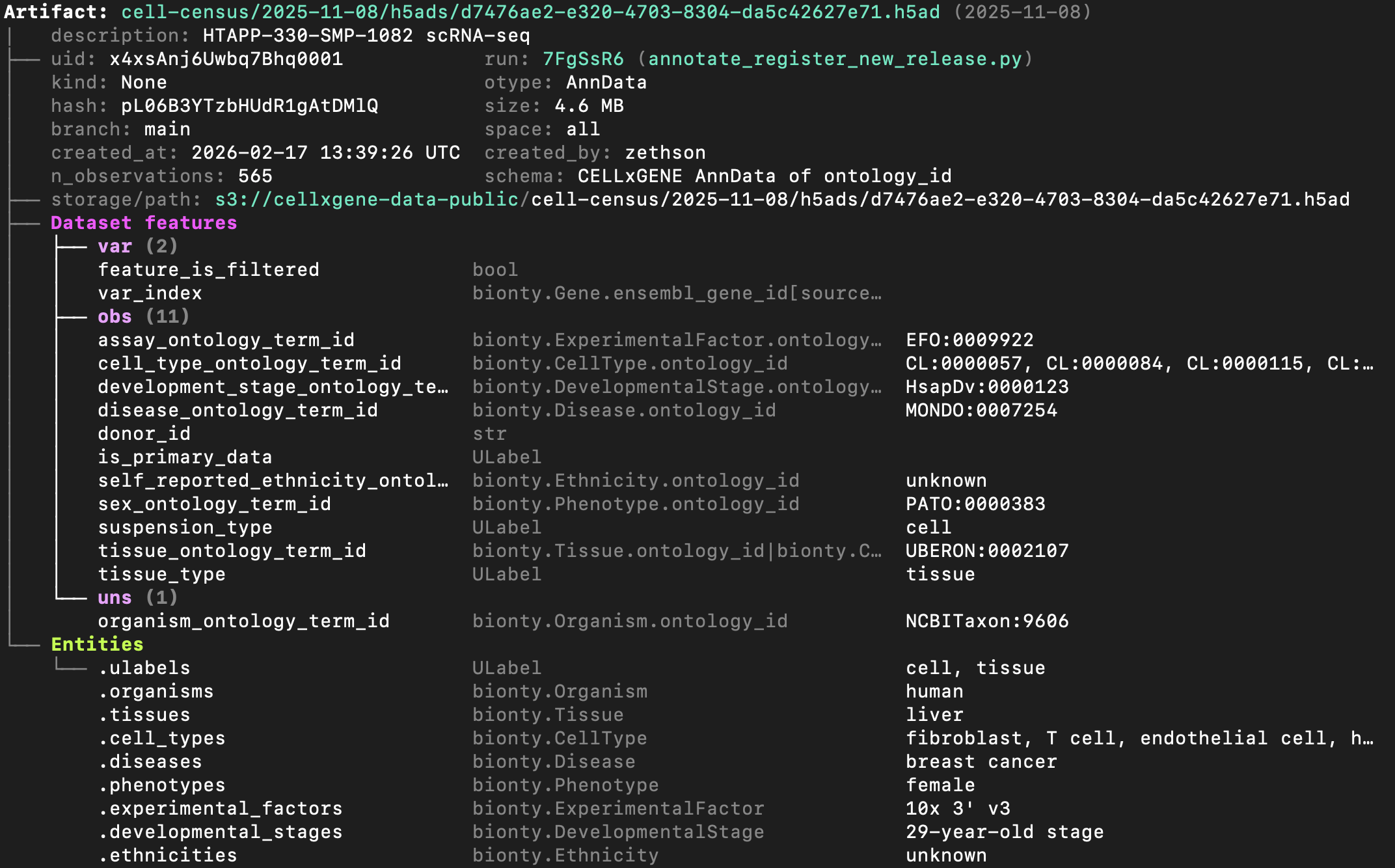
To explore the dataset on the UI, go here.
Access the content of the artifact via one of:
local_path = artifact.cache()  # return a local path from a cache
adata = artifact.load()        # load object into memory
accessor = artifact.open()     # return a streaming accessor
local_path <- artifact$cache()  # return a local path from a cache
adata <- artifact$load()        # load object into memory
accessor <- artifact$open()     # return a streaming accessor
Query a set of artifacts by entities using Django’s __ syntax:
db.Artifact.filter(tissues__name="liver").to_dataframe()
db$Artifact$filter(tissues__name = "liver")$to_dataframe()
Query by features using expressions:
tissue_feature = db.Feature.get(name="tissue_ontology_term_id")
db.Artifact.filter(
    tissue_feature == db.bionty.Tissue.get(name="liver")
).to_dataframe()
tissue_feature <- db$Feature$get(name = "tissue_ontology_term_id")
db$Artifact$filter(
    tissue_feature == db$bionty$Tissue$get(name = "liver")
)$to_dataframe()
Access sharded datasets
Access a validated, versioned collection of artifact shards in parquet format:
db = ln.DB("laminlabs/1000genomes")
collection = db.Collection.get("hVu9puwdRGskm1I6")
collection.schema.describe()
db <- ln$DB("laminlabs/1000genomes")
collection <- db$Collection$get("hVu9puwdRGskm1I6")
collection$schema$describe()
Ad-hoc query a sharded dataset.
See the validating schema of the collection (explore):
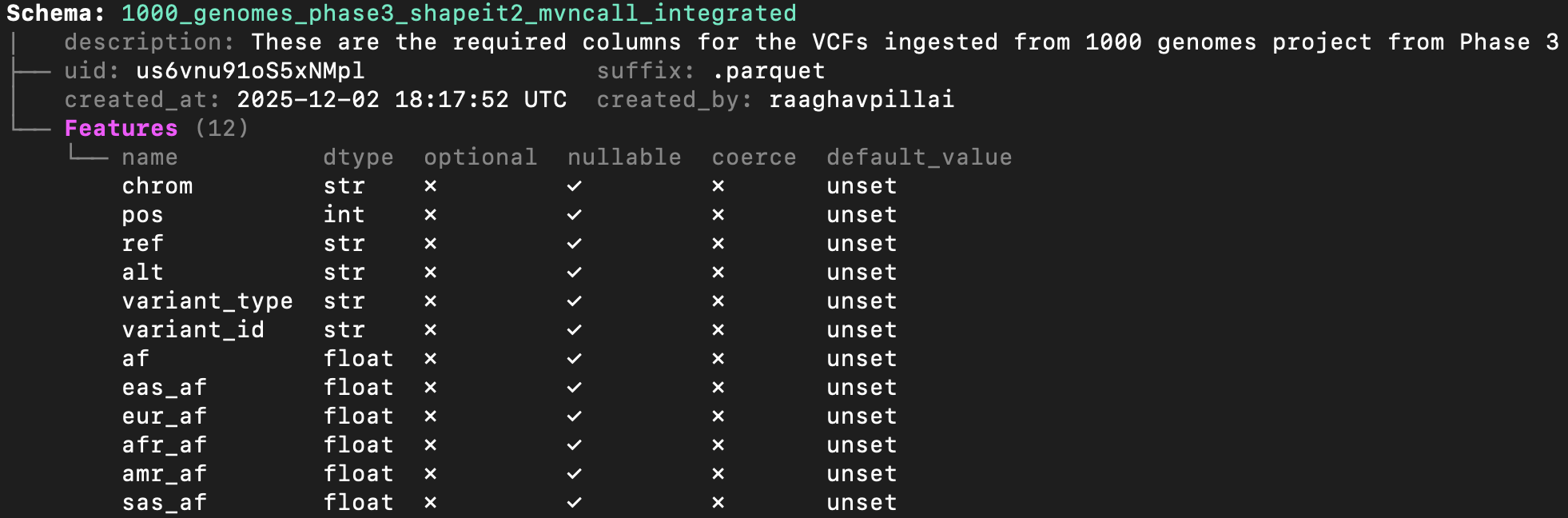
This example uses polars to filter the collection of parquet files:
chrom = "1"
lo, hi = 150_000_000, 200_000_000

with collection.open(engine="polars") as df:
    filtered = df.filter(
        (pl.col("chrom") == chrom) & (pl.col("pos") >= lo) & (pl.col("pos") <= hi)
    ).collect()
Access a collection of artifact shards in zarr format:
db = ln.DB("laminlabs/arrayloader-benchmarks")
collection = db.Collection.get(key="Tahoe100M_zarr")
collection.artifacts.to_dataframe()
db <- ln$DB("laminlabs/arrayloader-benchmarks")
collection <- db$Collection$get(key = "Tahoe100M_zarr")
collection$artifacts$to_dataframe()
Train a model on a sharded dataset.
This example uses annbatch with the pre-shuffled sharded Tahoe100M_zarr collection (explore):
import anndata as ad
import zarr
from annbatch import Loader

paths = [artifact.cache() for artifact in collection.artifacts.all()]
loader = Loader(shuffle=True, batch_size=4096, chunk_size=256, preload_nchunks=64)
loader.add_datasets(
    datasets=[ad.io.sparse_dataset(zarr.open(p)["X"]) for p in paths],
    obs=[ad.io.read_elem(zarr.open(p)["obs"]) for p in paths],
)
for batch in loader:
    pass
Create artifacts
To initialize a new database in a development directory, run:
lamin init --modules bionty # mount module bionty
To connect to an existing database - you can create a hosted one at lamin.ai - run:
lamin login
lamin connect account/name  # tip: add flag `--here` to scope to current directory
To save a file or folder:
import lamindb as ln
# → connected lamindb: account/instance

open("sample.fasta", "w").write(">seq1\nACGT\n")        # create dataset
ln.Artifact("sample.fasta", key="sample.fasta").save()  # save dataset
library(laminr)
ln <- import_module("lamindb")
# → connected lamindb: account/instance

writeLines(">seq1\nACGT\n", "sample.fasta")        # create dataset
ln$Artifact("sample.fasta", key = "sample.fasta")$save()  # save dataset
Or via the CLI:
lamin save sample.fasta --key sample.fasta
Load it.
To load an artifact via the CLI into a local cache, run:
lamin load --key sample.fasta
Read more about the CLI: docs.lamin.ai/cli.
Trace data, code & agents
To track an agent session, run: uvx library-skills --skill lamindb.
To track a script or notebook run with source code, inputs, outputs, logs, and environment:
import lamindb as ln
# → connected lamindb: account/instance

ln.track()                                              # track code execution
open("sample.fasta", "w").write(">seq1\nACGT\n")        # create dataset
ln.Artifact("sample.fasta", key="sample.fasta").save()  # save dataset
ln.finish()                                             # mark run as finished
library(laminr)
ln <- import_module("lamindb")
# → connected lamindb: account/instance

ln$track()                                              # track code execution
writeLines(">seq1\nACGT\n", "sample.fasta")        # create dataset
ln$Artifact("sample.fasta", key = "sample.fasta")$save()  # save dataset
ln$finish()                                             # mark run as finished
Explore data lineage after running this snippet as a script (python create_fasta.py):
artifact = ln.Artifact.get(key="sample.fasta")  # get artifact by key
artifact.describe()      # context of the artifact
artifact.view_lineage()  # fine-grained lineage
artifact <- ln$Artifact$get(key = "sample.fasta")  # get artifact by key
artifact$describe()      # context of the artifact
artifact$view_lineage()  # fine-grained lineage

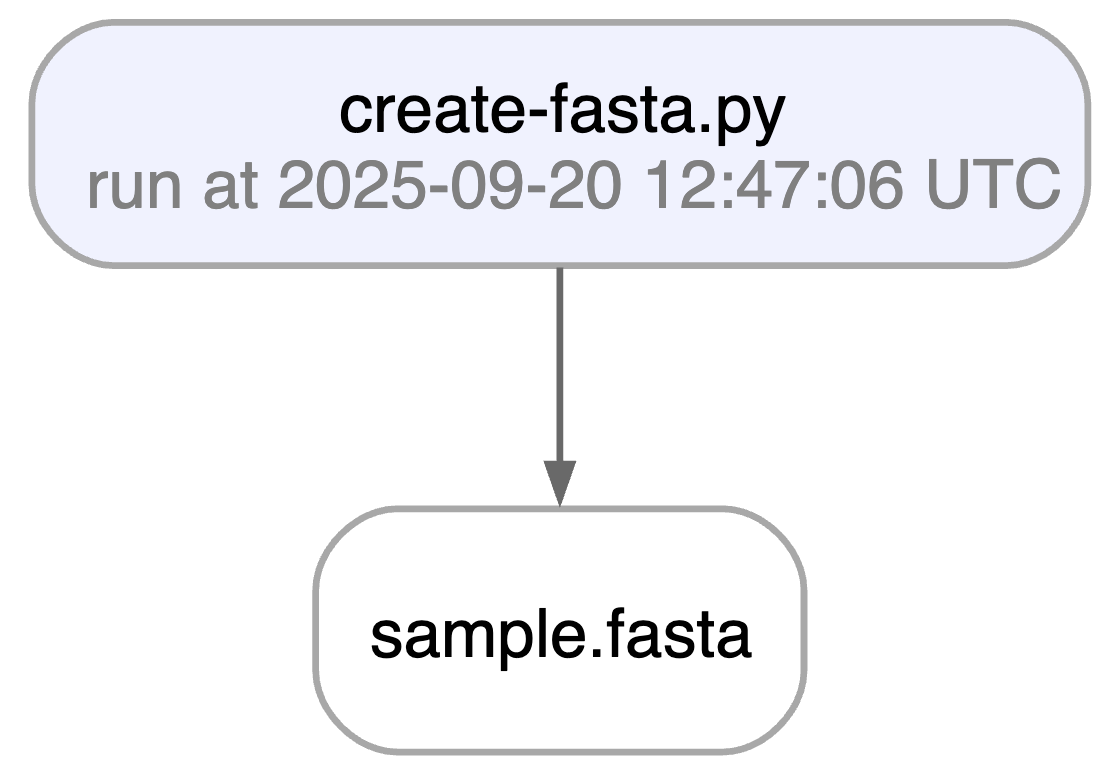
Watch a mini video: youtu.be/yK3ODFZLL1A
Access run & transform.
run = artifact.run                     # get the run object
transform = artifact.run.transform     # get the transform object
run.describe()                  # context of the run
run <- artifact$run                     # get the run object
transform <- artifact$run$transform     # get the transform object
run$describe()                  # context of the run
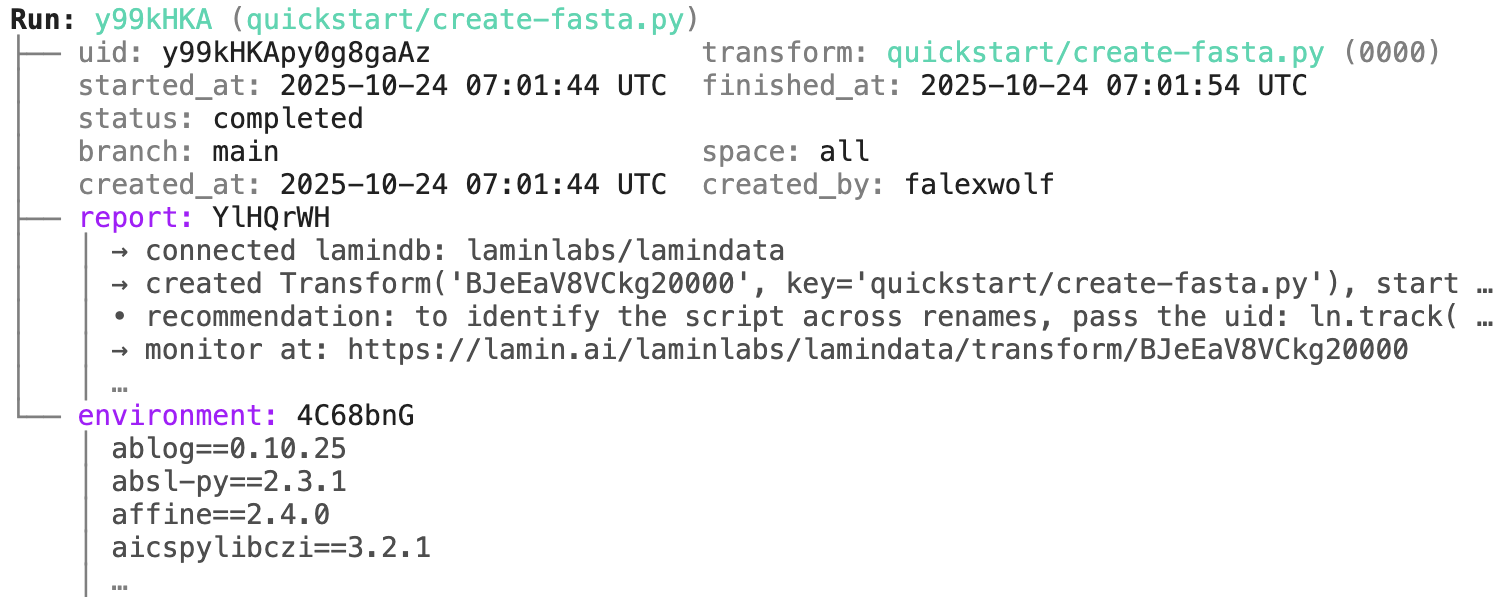
transform.describe() # context of the transform
transform$describe() # context of the transform
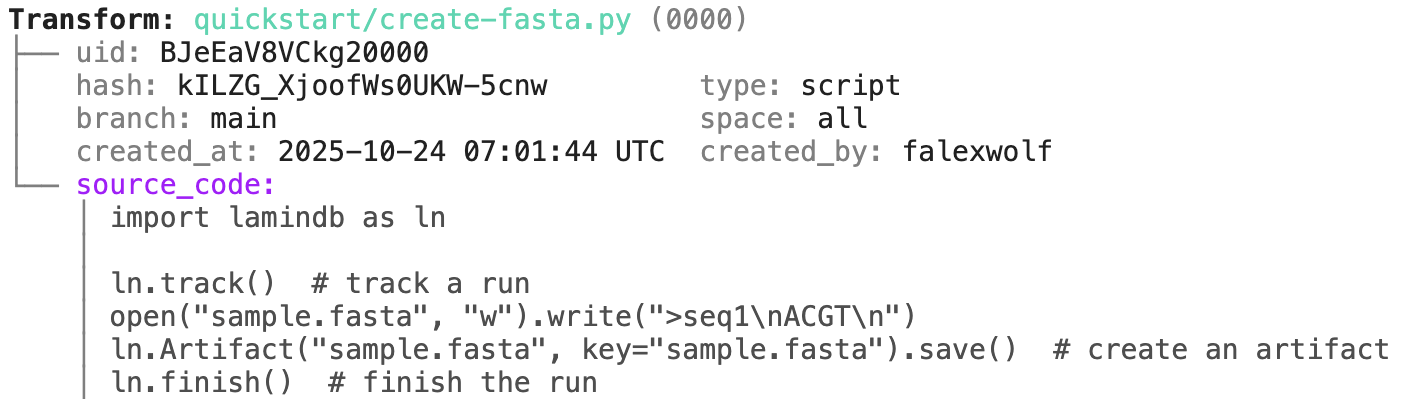
To track a workflow, decorate a function:
import lamindb as ln

@ln.flow()
def create_fasta(fasta_file: str = "sample.fasta"):
    open(fasta_file, "w").write(">seq1\nACGT\n")    # create dataset
    ln.Artifact(fasta_file, key=fasta_file).save()  # save dataset

if __name__ == "__main__":
    create_fasta()
Beyond what you get for scripts & notebooks, this automatically tracks function & CLI params and integrates well with established Python workflow managers: docs.lamin.ai/track. To integrate pipeline managers like Nextflow, see docs.lamin.ai/pipelines.
A richer example.
Here is a re-construction of the project of Schmidt et al. (Science, 2022):
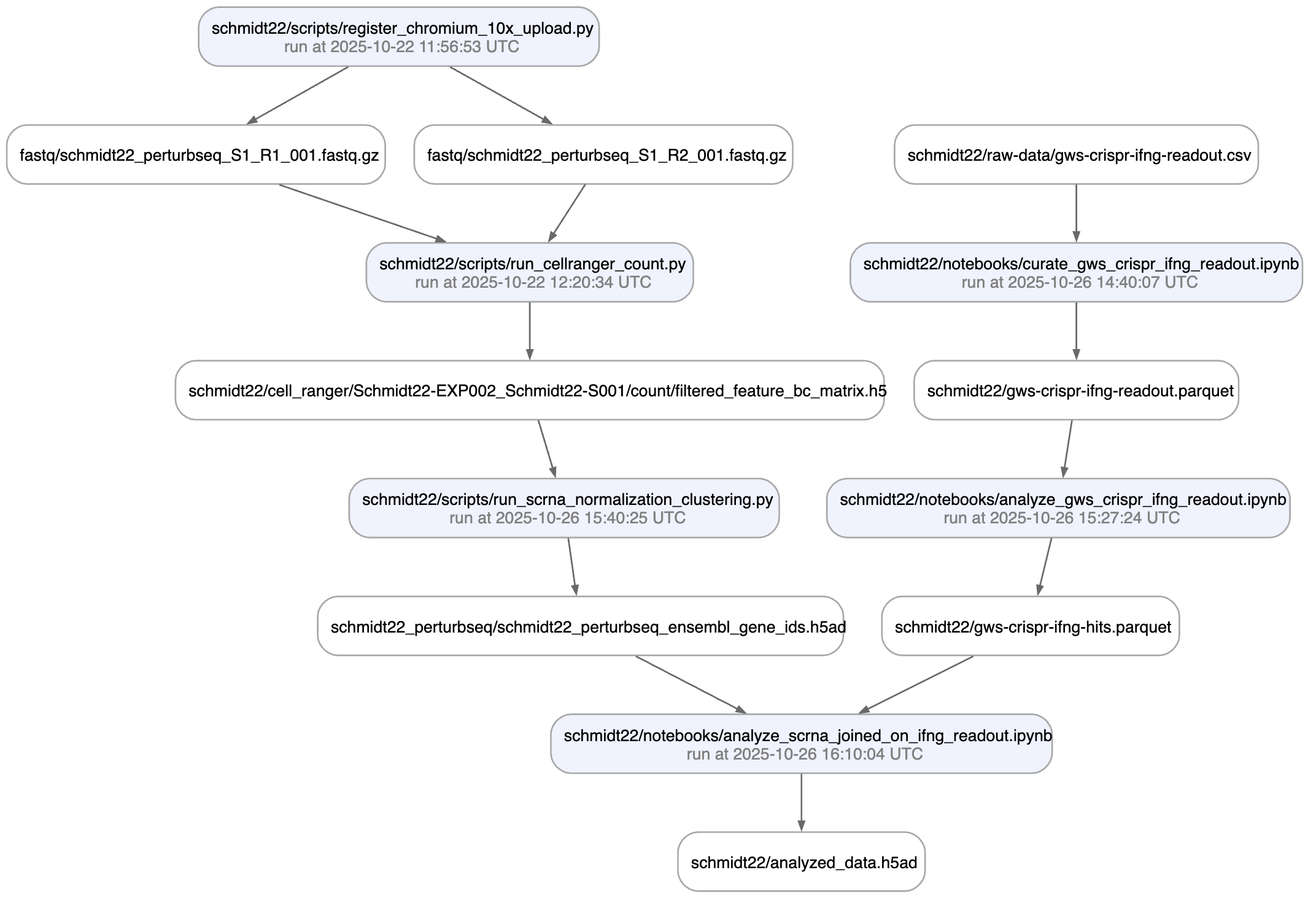
A phenotypic CRISPRa screening result is integrated with scRNA-seq data. Here is the result of the screen input:
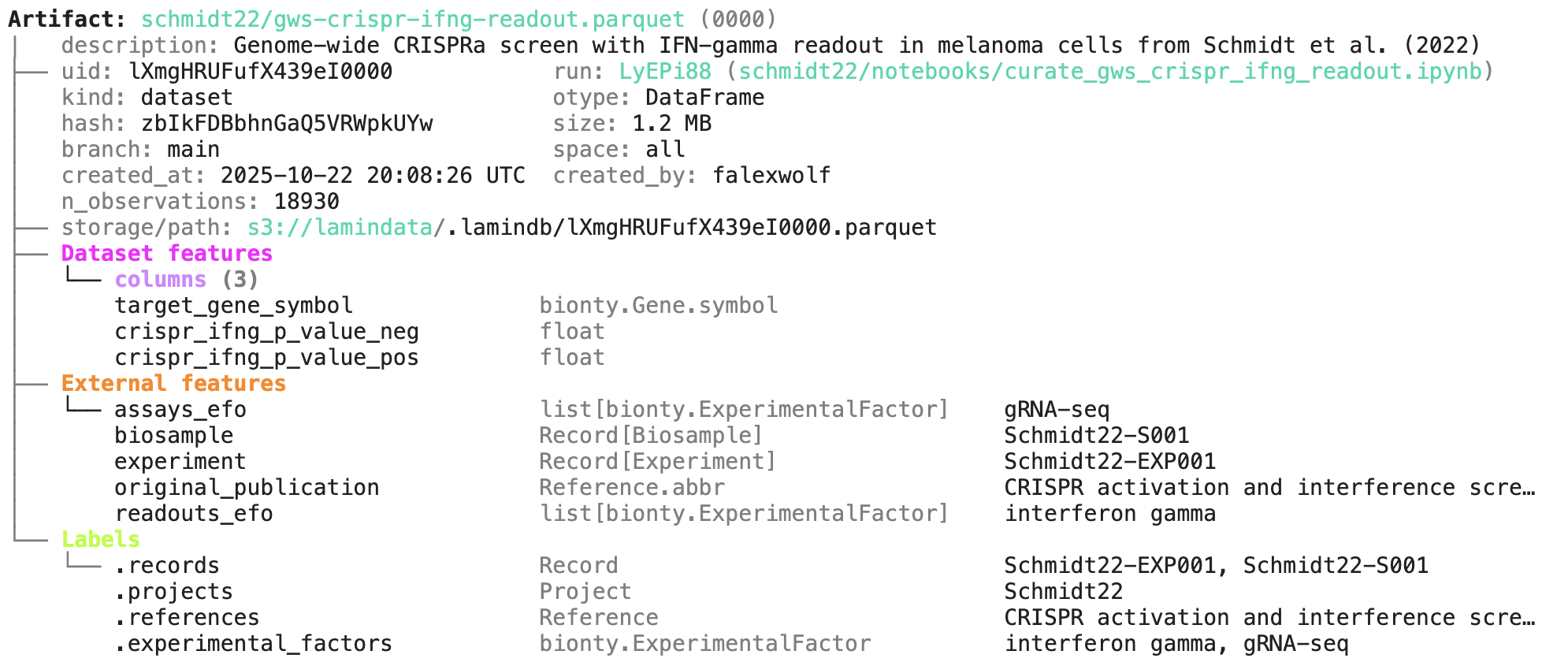
You can explore it here.
Annotate & query artifacts
To annotate and query by entities:
# create entities
my_label = ln.ULabel(name="My universal label").save()
my_project = ln.Project(name="My project label").save()

# annotate
artifact.ulabels.add(my_label)
artifact.projects.add(my_project)

# query
ln.Artifact.filter(ulabels=my_label, projects=my_project).to_dataframe()
# create entities
my_label <- ln$ULabel(name = "My universal label")$save()
my_project <- ln$Project(name = "My project label")$save()

# annotate
artifact$ulabels$add(my_label)
artifact$projects$add(my_project)

# query
ln$Artifact$filter(ulabels = my_label, projects = my_project)$to_dataframe()
This also works for entities imported from modules, for example, ontology terms:
import bionty as bt

# import an entity from a public ontology source, e.g., by name or an ontology ID
hek293 = bt.CellLine.from_source(name="HEK293").save()
hras = bt.Gene.from_source(ensembl_gene_id="ENSG00000174775").save()

# annotate
artifact.cell_lines.add(hek293)
artifact.genes.add(hras)

# query
ln.Artifact.filter(cell_lines=hek293, genes=hras).to_dataframe(
    include=["cell_lines__name", "genes__symbol"]
)
bt <- import_module("bionty")

# import an entity from a public ontology source, e$g., by name or an ontology ID
hek293 <- bt$CellLine$from_source(name = "HEK293")$save()
hras <- bt$Gene$from_source(ensembl_gene_id = "ENSG00000174775")$save()

# annotate
artifact$cell_lines$add(hek293)
artifact$genes$add(hras)

# query
ln$Artifact$filter(cell_lines = hek293, genes = hras)$to_dataframe(
    include = list("cell_lines__name", "genes__symbol")
)
To annotate & query by features:
from datetime import date

# define a feature type and features
sequences = ln.Feature(name="Sequences", is_type=True).save()
gc_content = ln.Feature(name="gc_content", dtype=float, type=sequences).save()
seq_date = ln.Feature(name="seq_date", dtype=date, type=sequences).save()

# annotate
artifact.features.set_values({
    gc_content: 0.55,
    seq_date: date.today(),
})

# query
ln.Artifact.filter(seq_date == date.today()).to_dataframe(include="features")
datetime <- import_module("datetime")
date <- datetime$date

# define a feature type and features
sequences <- ln$Feature(name = "Sequences", is_type = TRUE)$save()
gc_content <- ln$Feature(name = "gc_content", dtype = "float", type = sequences)$save()
seq_date <- ln$Feature(name = "seq_date", dtype = date, type = sequences)$save()

# annotate
artifact$features$set_values(list(
    gc_content = 0.55,
    seq_date = date$today()
))

# query
ln$Artifact$filter(seq_date == date$today())$to_dataframe(include = "features")
To query by auto-tracked metadata:
# by storage location and size
ln.Artifact.filter(storage__root=ln.settings.storage.root)
ln.Artifact.filter(size__gt=1e6).to_dataframe()

# by data lineage
ln.Artifact.filter(run=run).to_dataframe()
ln.Artifact.filter(run__transform=transform).to_dataframe()

# include more information in resulting dataframe
ln.Artifact.to_dataframe(include=["run__transform__key", "storage__root"])
# by storage location and size
ln$Artifact$filter(storage__root = ln$settings$storage$root)
ln$Artifact$filter(size__gt = 1e6)$to_dataframe()

# by data lineage
ln$Artifact$filter(run = run)$to_dataframe()
ln$Artifact$filter(run__transform = transform)$to_dataframe()

# include more information in resulting dataframe
ln$Artifact$to_dataframe(include = list("run__transform__key", "storage__root"))
This document provides more background and details for several of the bullets.
Distributed architecture
Within a single team, collaborators often share a central database as their source of truth. However, across teams and organizations, LaminDB is typically used as a distributed system — databases and storage locations are distributed across different clouds or physical machines, with objects seamlessly shared and transferred between them. For example, one team might work in a LaminDB instance on AWS, while another team operating on GCP imports and builds upon those assets. Yet another team might run LaminDB entirely on-prem.
Distributing data across LaminDB instances is meaningful even on the same machine or on the same cloud: it allows teams to completely decouple their work, enabling them to move faster without aligning on schema and naming conventions.
Transferring data between LaminDB instances has three noteworthy properties:
it’s lineage-aware: that is, information about the upstream instance is stored in the downstream instance
it defaults to zero-copy: rather than copying terabytes of data, a downstream instance only receives a metadata record; this makes re-using data fast and lightweight
it’s idempotent: a repeated transfer does not duplicate data, making it safe to sync updates
For details, see Transfer & sync across databases .
One can also create full “clones” of databases by running lamin io export or lamin io snapshot, which is particularly useful to expose metadata in a serverless manner via an SQLite instance.
The distributed architecture allows organizations to build a global, interconnected data ecosystem without requiring centralized infrastructure.
Lakehouse architecture
Working with a high number of raw files across different sources almost inevitably leads to fragile data organization. This brittleness is amplified when working with agents: they prioritize solving the immediate task over long-term maintainability, they make frequent mistakes, and their concurrent read/write patterns can quickly corrupt a purely file-based architecture. Lakehouse frameworks solve these problems with ACID transactions to prevent partial writes, with schema enforcement to prevent inconsistent datasets, and with time travel to easily restore erroneous written datasets. They also make agents more efficient.[1] Let’s briefly review available options.
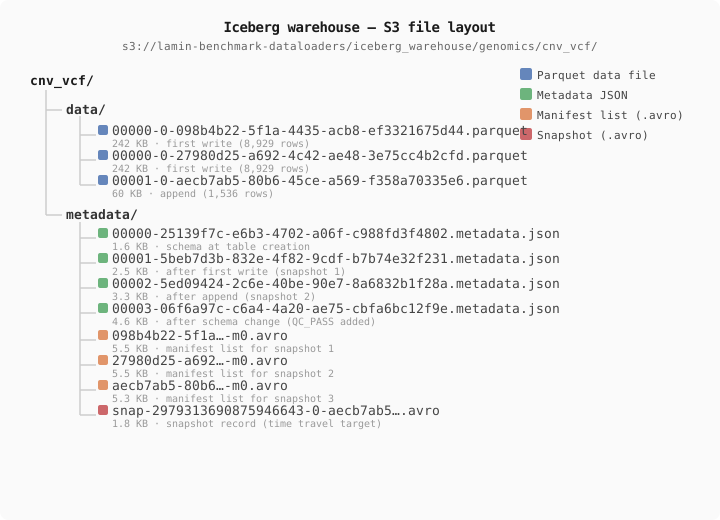 *File layout of an Iceberg table.*
Today’s most popular framework is Iceberg.[2] Like Delta Lake[3][4] and Apache Hudi,[5] Iceberg provides ACID transactions and “time travel” by organizing parquet files into snapshots, managed by manifest and metadata files (Figure 4). However, this file-based metadata introduces costs (snapshot creation is expensive dictating large, infrequent writes), optimistic concurrency leads to conflicts between simultaneous writers, and coordinating updates on S3 requires an external catalog like AWS Glue or Nessie.[6]
Feature |
Raw S3 |
Iceberg |
DuckLake |
LaminDB |
|---|---|---|---|---|
Data lake (file management & annotation) |
✅ |
❌ |
❌ |
✅ |
ACID transactions |
❌ |
✅ |
✅ |
✅ ¹ |
Time travel / snapshot version isolation |
❌ |
✅ |
✅ |
✅ ² |
Schema evolution without rewriting data |
❌ |
✅ ³ |
✅ ³ |
✅ ³ |
Write-Audit-Publish workflow |
❌ |
✅ |
❌ |
✅ ⁴ |
Automatic maintenance |
❌ |
❌ |
✅ ⁵ |
✅ ⁵ |
Dataset formats beyond tables |
✅ |
❌ |
❌ |
✅ |
Data lineage |
❌ |
❌ |
❌ |
✅ |
Registries/ontologies |
❌ |
❌ |
❌ |
✅ |
A high-level overview of lakehouse technologies.
¹ LaminDB provides snapshot isolation and time travel by managing dataset state as transactional metadata records in Postgres/SQLite rather than mutating existing files. While it does not perform in-place row-level mutations like a SQL database, operations like Collection.append() atomically create new collection versions pointing to new, immutable artifacts. This extends core lakehouse ACID guarantees to multimodal datasets, explicitly rejecting conflicting concurrent revisions. For more, see Will data & metadata stay in sync? .
² See the Developer experience section for examples.
³ Adding a nullable/optional column without rewriting existing files.
⁴ In LaminDB, via branches (draft, review, merge).
⁵ Less excessive or no need for cleaning orphaned files like in Iceberg.
An increasingly popular approach to addressing Iceberg’s limitations is DuckLake,[7][8] developed by the DuckDB team. Rather than storing metadata in files, DuckLake keeps all metadata in a relational database, leaving only parquet files in storage. This gives it cheap writes that can be more frequent, transactions with true concurrent writer support, automatic maintenance via the database’s native mechanisms, and native multi-table transactions — all things that are difficult or impossible with Iceberg’s file-based metadata. A complementary development in operational workloads is Lakebase, which decouples Postgres database compute and storage via Write-Ahead Logs in object storage. This brings serverless, transactional Postgres to live applications and agents, while continuously syncing operational row changes into analytical lakehouses like Delta Lake.
LaminDB shares DuckLake’s core architectural pattern — using a relational database for metadata and object storage for data — but extends it beyond tables to support any format, in particular, parquet, zarr, AnnData, HDF5, and others. This enables unified schema management, data lineage, and registry annotations across complex, multimodal datasets (Table 1).
While Iceberg & DuckLake are based on the parquet format, and LaminDB is format-agnostic, LanceDB manages datasets in the Lance format, a columnar format inspired by parquet that’s optimized for arrays.[9] To use LanceDB, you need to convert your data into the Lance format.
While LanceDB fits the lakehouse architecture, non-lakehouse architectures for managing array-like data exist, too, in particular, arraylake & tensorstore for .zarr arrays, and tiledb for .tiledb arrays.[10] These non-lakehouse technologies are out of scope for this post given the established query engines don’t apply to them.
Decoupled compute
Rather than locking metadata resolution inside a dedicated query engine or custom SQL driver, LaminDB acts as an independent semantic orchestration layer.
When executing analytical queries, LaminDB first resolves metadata in Postgres or SQLite to yield precise object storage paths. You then pass these paths directly to modern open-source engines like DuckDB, Polars, or PySpark. Because these engines read native Parquet and Zarr files directly over object storage, query execution retains full optimization benefits:
Projection Pushdowns: Only downloading requested columns.
Filter Pushdowns: Reading file footers to execute row-group pruning and skip irrelevant data blocks before fetching them.
This decoupled design ensures that using LaminDB for provenance, lineage, and ACID governance introduces minimal performance overhead during data processing and analytics. See Query tables in storage for implementation details.
Branching & idempotency
To safely delegate tasks to autonomous agents and distributed teams, data infrastructure must support non-destructive experimentation and repeatable execution.
Git-like branching (Write-Audit-Publish): LaminDB provides database-level branching (
stage,review,merge) to support isolated workflows, similar to tools like git or Nessie.[6] Rather than spinning up a new isolated metadata database clone, the underlying database and its schema remain shared. Isolation is achieved by letting all objects in LaminDB live on a branch viaSQLRecord’sbranchfield. This means that newly created objects are isolated on their creation branch. Similarly, changes to versioned objects (artifacts, collections, transforms, and blocks/notes) are isolated on the creation branch of a new version of an object. For example, modifying an artifact or note block creates a new version isolated to the current branch. What LaminDB’s branching does not achieve is isolating in-place updates to existing objects, which remain shared across all branches. Achieving that, in the context of Postgres or SQLite, would typically be resolved by creating new SQL databases and much overhead. For more, see Manage changes.Idempotent execution: Re-running Python scripts, workflow tasks (Nextflow, Snakemake), or agent traces is inherently safe. LaminDB validates content hashes and metadata prior to writing, preventing duplicate artifacts or dangling storage objects within the scope of content-hash reuse. For details, see Will data get duplicated upon re-running code? .
Schema evolution & time travel
To see how these concepts translate into developer experience, let’s compare the code required to perform these essential agentic operations—appending data, evolving schemas, and time-traveling.
The first type of write operation we need to perform is adding new data to the system. Rather than just dropping a raw file into a bucket, the following code snippets ensure that a new dataset complies with the schema of the existing dataset, and that it’s added in an ACID fashion.
Atomic and snapshot-isolated. A new parquet file creates a new collection version.
collection.append(batch) # batch is an artifact
Atomic and snapshot-isolated. New Parquet files and a snapshot manifest are written to S3; concurrent readers see a consistent state throughout.
table.append(batch) # batch is a pyarrow dataset
add() writes new rows to S3 and automatically increments the table version.
table.add(batch) # batch is a pyarrow dataset
Similarly, when an analysis requires new features, the following snippets ensure that columns are updated consistently across the entire dataset, and future incoming datasets.
LaminDB registers the feature in its schema registry, validating all future artifacts instance-wide.
feature = ln.Feature(name="QC_PASS", dtype=bool).save()
collection.schema.add(feature)
A new metadata file records the updated schema. Existing Parquet files are not modified; reads of old files return null for the new column.
from pyiceberg.types import BooleanType
with table.update_schema() as update:
    update.add_column("QC_PASS", BooleanType())
add_columns takes a per-column SQL value expression — hence the CAST(NULL AS BOOLEAN) string, which supplies both the value and its type for existing rows.
table.add_columns({"QC_PASS": "CAST(NULL AS BOOLEAN)"})
Finally, because agents inevitably make mistakes, we look at how to retrieve a previous version of a dataset via “time travel”.
collection.versions.get(version="1") # get a previous version
first_snapshot = table.history()[0].snapshot_id  # access version 0
table.scan(snapshot_id=first_snapshot)
table.checkout(1) # checkout a previous version
Permissions
See Access permissions.
Metadata schema & API
LaminDB provides a SQL schema for common metadata entities: Artifact, Collection, Transform, Feature, Record etc. - see the API reference or the source code.
The core metadata schema is extendable through modules, e.g., with basic biological (Gene, Protein, CellLine, etc.) & operational entities (Biosample, Techsample, Treatment, etc.).
Data models are defined in Python using the Django ORM. Django translates them to SQL tables. Django is one of the most-used & highly-starred projects on GitHub and has been robustly maintained for 15 years. While the SQLAlchemy ORM has some advantages, Django has been the most popular choice for building metadata management systems in the life sciences for over a decade.
On top of the metadata schema, LaminDB is a Python API that models datasets as artifacts, abstracts storage & database access, data transformations, and ontologies.
Modules
LaminDB can be extended with modules building on the Django ecosystem. Examples are:
bionty: Basic biological ontologies, with easy import from >20 public ontologies
pertdb: Registries for perturbations (compounds, biologics, genetic interventions, etc.)
If you’d like to create your own module:
Create a git repository with registries similar to pertdb
Create & deploy migrations via
lamin migrate createandlamin migrate deploy
For more information, see Install & setup.
Repositories
LaminDB and its plugins consist in open-source Python libraries & publicly hosted metadata assets. The two central repositories are:
lamindb: Core library.
lamin-docs: Documentation for all tools.
Two basic dependencies come with lamindb as git submodules here:
lamindb-setup: Setup & configure LaminDB.
lamin-cli: The CLI.
Some integrations and use cases are maintained in their own repositories:
nf-lamin: Nextflow integration with LaminDB.
laminr: R client for LaminDB.
lamin-usecases: Mixed use cases.
lamin-agents: Agentic use cases.
redun-lamin: Track redun workflow runs with LaminDB.
lamin-mlops: MLOps use cases (MNIST, W&B, MLflow, Croissant).
cellxgene-lamin: CELLxGENE data and curation.
lamin-spatial: Spatial data (RxRx, Vitessce).
snakemake-lamin: Track Snakemake runs with LaminDB.
For a comprehensive list of open-sourced software, browse our GitHub account, for instance,
readfcs: FCS artifact reader.
There is a public repository for LaminHub:
laminhub-public: Make issues and follow releases of LaminHub, no source code.