CLI  

Manage data with LaminDB instances.
How do I enable shell autocompletion?
On MacOS, enable shell autocompletion by adding the following to your ~/.zshrc:
autoload -Uz compinit && compinit
eval "$(_LAMIN_COMPLETE=zsh_source lamin)"
Configure your environment
connect
Set the default database for this directory.
This command updates your local configuration to target the specified instance: all subsequent CLI commands and Python/R sessions will auto-connect to this instance.
You can pass a slug (account/name) or URL (https://lamin.ai/account/name).
# set a default database for the current directory (recommended)
lamin connect laminlabs/cellxgene --here
# set a default database for the entire home directory
lamin connect laminlabs/cellxgene
# use a URL instead of a slug
lamin connect https://lamin.ai/laminlabs/cellxgene
Options:
lamin connect [OPTIONS] INSTANCE

Options:
  --here  Connect in the current directory without changing the global default
          instance.
  --help  Show this message and exit.
→ Python/R alternative: create a database object via DB or set the default database of your Python/R session via connect()
info
Show info about the database, branch, space, and user.
Manage settings via lamin settings.
Options:
lamin info [OPTIONS]

Options:
  --schema  View database schema via Django plugin.
  --help    Show this message and exit.
→ Python/R alternative: settings()
init
Initialize a database in the current directory.
Create a new development directory for your source code and cd into it:
mkdir mydata && cd mydata
Initialize a local SQLite database in that directory:
lamin init
lamin init --modules bionty
lamin init --modules bionty,pertdb
Initialize a SQLite database that’s hosted on S3 along with all files managed by the LaminDB instance:
lamin init --storage s3://my-bucket
lamin init --storage gs://my-bucket
Initialize a PostgresSQL database with a storage location on S3:
lamin init --storage s3://my-bucket --db "postgresql://user:password@host:port/database"
Options:
lamin init [OPTIONS]

Options:
  --storage TEXT  A local or remote folder (`'s3://...'` or `'gs://...'`).
                  Defaults to `./storage`.
  --name TEXT     Instance name. If no storage location is passed, uses the
                  current working directory name (like git). Otherwise uses
                  the name of the storage location.
  --db TEXT       PostgreSQL connection URI. Defaults to `None`, which implies
                  an SQLite file in the storage location.
  --modules TEXT  Comma-separated string of schema modules.
  --help          Show this message and exit.
→ Python/R alternative: init()
disconnect
Unset the default database for this directory.
With
--here, it clears the default database for the current directory.Without
--here, it clears the default database for the entire home directory.
For example:
lamin disconnect --here
lamin disconnect
Options:
lamin disconnect [OPTIONS]

Options:
  --here  Disconnect local directory context without changing the global
          default instance.
  --help  Show this message and exit.
→ Python/R alternative: disconnect()
Save, load, create & delete
save
Save a file or folder as an artifact, transform, or record.
Save a dataset or model as Artifact:
lamin save my_table.csv --key my_tables/my_table.csv
Pass --batch-size to control parallel file transfers when saving artifact folders (default 128). Reducing to 20 or lower can help with network errors:
lamin save my_folder --key my_tables --batch-size 20
Pass --store-kwargs as a JSON object for fine-grained upload settings (normally not needed):
lamin save my_table.csv --key my_tables/my_table.csv --store-kwargs '{"chunksize": 1000000}'
Save source code as Transform:
lamin save my_script.py --key my_scripts/my_script.py
Save a markdown note as Record:
lamin save my-topic/my-note.md # resolves `my-topic` as a record page
Save a README for the entire database:
lamin save README.md
The save command defaults to saving
.py, .ipynb, .R, .Rmd, and .qmd files as Transform
and - if ommitting --key - .md files as Record.
You can enforce saving a file as an Artifact by passing --registry artifact.
You can pass a project to --project to label the artifact by project.
If you pass a --space or --branch identifier, you save the artifact in the corresponding Space or on the corresponding Branch.
Save an agent plan as Artifact:
lamin save /path/to/.cursor/plans/my_task.plan.md
lamin save /path/to/.claude/plans/my_task.md
How are agent plans handled?
Plan files are detected by suffix .plan.md (Cursor) or by being under .claude/plans/
(Claude Code). For such paths, the key defaults to .plans/<filename>, the artifact kind
is set to plan, and the description is taken from the markdown front matter (name: and
overview:). The stored artifact contains only the body (the YAML front matter is stripped).
git: When saving scripts, files will be synced with a git repo if you set:
export LAMINDB_SYNC_GIT_REPO=https://github.com/org/repo
Also see: Sync code with git
Options:
lamin save [OPTIONS] PATH

Options:
  --key TEXT                      The key of the artifact or transform.
  --description TEXT              A description of the artifact or transform.
  --kind TEXT                     Artifact kind (e.g. 'plan', 'dataset',
                                  'model'). Overrides auto-inferred kind for
                                  plan files.
  --stem-uid TEXT                 The stem uid of the artifact or transform.
  --project TEXT                  A valid project name or uid.
  --space TEXT                    A valid space name or uid.
  --branch TEXT                   A valid branch name or uid.
  --registry [artifact|transform|record]
                                  Either 'artifact', 'transform', or 'record'.
                                  If not passed, chooses based on path suffix.
  --batch-size INTEGER            Number of files transferred in parallel when
                                  saving artifact folders (default 128).
                                  Reducing to 20 or lower can help with
                                  network errors.
  --store-kwargs TEXT             Fine-grained settings for uploads as a JSON
                                  object (normally not needed), e.g.
                                  '{"chunksize": 1000000}'.
  --help                          Show this message and exit.
load
Sync a file/folder into a local cache (artifacts) or development directory (transforms, records).
Pass an entity or a --key. For example:
# artifacts & transforms via --key
lamin load --key mydatasets/mytable.parquet
lamin load --key analysis.ipynb
lamin load --key myanalyses/analysis.ipynb --with-env
# notes via name and topic/type hierarchy
lamin load README.md
lamin load my-topic/my-note.md
# anything via URL
lamin load https://lamin.ai/account/instance/artifact/e2G7k9EVul4JbfsE
# anything via registry and --uid
lamin load artifact --uid e2G7k9EVul4JbfsE
lamin load transform --uid Vul4JbfsEYAy5
Pass --batch-size to control parallel file transfers when loading artifact or collection folders (default 128). Reducing to 20 or lower can help with network errors:
lamin load --key mydatasets/myfolder --batch-size 20
Pass --store-kwargs as a JSON object for fine-grained artifact or collection download settings (normally not needed):
lamin load --key mydatasets/mytable.parquet --store-kwargs '{"batch_size": 20}'
Options:
lamin load [OPTIONS] [ENTITY]

Options:
  --uid TEXT            The uid for the entity.
  --key TEXT            The key for the entity.
  --with-env            Also return the environment for a tranform.
  --batch-size INTEGER  Number of files transferred in parallel when loading
                        artifact or collection folders (default 128). Reducing
                        to 20 or lower can help with network errors.
  --store-kwargs TEXT   Fine-grained settings for artifact or collection
                        downloads as a JSON object (normally not needed), e.g.
                        '{"batch_size": 20}'.
  --help                Show this message and exit.
→ Python/R alternative: load(), no equivalent for transforms
create
Create an object.
Currently only supports creating branches and projects.
Use lamin save to create artifacts, transforms, and records.
Examples:
lamin create branch my_branch
lamin create project my_project
Options:
lamin create [OPTIONS] {branch|project} [NAME]

Options:
  --help  Show this message and exit.
delete
Delete an object.
# via --key or --name
lamin delete artifact --key mydatasets/mytable.parquet
lamin delete transform --key myanalyses/analysis.ipynb
lamin delete branch --name my_branch
lamin delete project --name my_project
# via --uid
lamin delete artifact --uid e2G7k9EVul4JbfsE
lamin delete transform --uid Vul4JbfsEYAy5
# via URL
lamin delete https://lamin.ai/account/db/artifact/e2G7k9EVul4JbfsE
To permanently delete an object, pass --permanent.
To delete the entire database (will ask for confirmation):
lamin delete account/name
Options:
lamin delete [OPTIONS] ENTITY

Options:
  --name TEXT
  --uid TEXT
  --key TEXT   The key for the entity (artifact, transform).
  --permanent  Permanently delete the entity where applicable, e.g., for
               artifact, transform, collection.
  --force      Do not ask for confirmation (only relevant for instance).
  --help       Show this message and exit.
Describe, update, annotate & list
describe
Describe an object.
Examples:
# via URL
lamin describe https://lamin.ai/laminlabs/lamin-site-assets/artifact/6sofuDVvTANB0f48
lamin describe https://lamin.ai/laminlabs/lamin-site-assets/transform/uDVvTANB0f48
# via --key for artifacts
lamin describe --key example_datasets/mini_immuno/dataset1.h5ad
# via registry and one of --uid / --name / --key
lamin describe artifact --uid e2G7k9EVul4JbfsE
lamin describe transform --uid Vul4JbfsEYAy5
lamin describe run --uid 6sofuDVvTANB0f48
lamin describe record --name "Experiment 1"
lamin describe project --name "My Project"
lamin describe ulabel --name "My ULabel"
lamin describe branch  # defaults to current branch
lamin describe branch --include comments
lamin describe branch --name main
Options:
lamin describe [OPTIONS] [ENTITY]

Options:
  --uid TEXT            The uid for the entity.
  --key TEXT            The key for the entity (artifact, transform,
                        collection).
  --name TEXT           The name for the entity (record, project, ulabel,
                        branch).
  --include [comments]  Include additional content (e.g. 'comments' for readme
                        and comment blocks).
  --help                Show this message and exit.
→ Python/R alternative: describe()
annotate
Annotate an object.
You can annotate with projects, labels, records, version tags, a readme, a comment, and, for artifacts, with features. For example,
# via registry and --uid for any registry
lamin annotate artifact --uid e2G7k9EVul4JbfsE --project "My Project"
lamin annotate collection --uid abc123 --version "1.0"
# via registry and --name for any registry that has a name field
lamin annotate schema --name my_schema --readme README.md
# via registry and --key for any registry that as a key field
lamin annotate collection --key my_collection --version "1.0"
# via URL for any registry
lamin annotate https://lamin.ai/account/instance/artifact/e2G7k9EVul4JbfsE --project "My Project"
lamin annotate https://lamin.ai/account/instance/schema/123456ABCDEF --readme README.md
Annotating artifacts and transforms works via --key alone:
lamin annotate --key raw/sample.fastq --project "My Project"
lamin annotate --key raw/sample.fastq --ulabel "My ULabel" --record "Experiment 1"
lamin annotate --key raw/sample.fastq --version "1.0"
lamin annotate --key raw/sample.fastq --features perturbation=IFNG,DMSO cell_line=HEK297
lamin annotate --key raw/sample.fastq --readme README.md  # adds a readme to the artifact
lamin annotate --key raw/sample.fastq --comment "I think we should revisit this, tomorrow, WDYT?"
lamin annotate --key my-notebook.ipynb --project "My Project"
Branch defaults to the current branch:
lamin annotate branch --readme README.md # current branch; or --name my_branch
Options:
lamin annotate [OPTIONS] [ENTITY]

Options:
  --key TEXT       The key of an artifact, transform, or collection.
  --uid TEXT       The uid of the entity.
  --name TEXT      The name of the entity (record, project, ulabel, branch,
                   feature, schema, space).
  --project TEXT   A valid project name or uid.
  --ulabel TEXT    A valid ulabel name or uid.
  --record TEXT    A valid record name or uid.
  --version TEXT   A version tag for the artifact, transform, or collection.
  --features TEXT  Feature annotations (artifact/transform only). Supports:
                   feature=value, feature=val1,val2, or feature="val1","val2"
  --readme PATH    Path to a README file to attach as a readme block to the
                   entity.
  --comment TEXT   Comment text to attach as a comment block to the entity.
  --help           Show this message and exit.
→ Python/R alternative: artifact.features.add_values() via add_values(), artifact.projects.add(), artifact.ulabels.add(), artifact.records.add(), … via add(), and artifact.version_tag = \"1.0\"; artifact.save() for version tags.
update
Update an object.
Examples:
lamin update branch --status review                  # current branch
lamin update branch --name my_branch --status draft
lamin update artifact --key my_file.parquet --description "new description"
lamin update project --name my_project --description "updated project notes"
Options:
lamin update [OPTIONS] {artifact|transform|collection|project|branch}

Options:
  --uid TEXT                      The uid for the entity.
  --key TEXT                      The key for the entity (artifact, transform,
                                  collection).
  --name TEXT                     The name for the entity (project, branch).
  --status [standalone|draft|review|merged|closed]
                                  Set branch status (branch only).
  --description TEXT              Set description (artifact, transform,
                                  collection, project).
  --help                          Show this message and exit.
get
Get object metadata.
If no field flag is passed, this behaves like lamin describe.
If a field flag is passed, it reads that field from the resolved entity.
Examples:
lamin get branch --status                # current branch status
lamin get branch --name my_branch --status
lamin get artifact --key my_file.parquet --description
Options:
lamin get [OPTIONS] [ENTITY]

Options:
  --uid TEXT            The uid for the entity.
  --key TEXT            The key for the entity (artifact, transform,
                        collection).
  --name TEXT           The name for the entity (record, project, ulabel,
                        branch).
  --include [comments]  Include additional content (e.g. 'comments' for readme
                        and comment blocks).
  --status              Read branch status.
  --description         Read the description field.
  --help                Show this message and exit.
list
List objects.
For example:
lamin list branch
lamin list space
Options:
lamin list [OPTIONS] REGISTRY

Options:
  --limit INTEGER RANGE  Maximum number of rows to display.  [default: 20;
                         x>=1]
  --help                 Show this message and exit.
→ Python/R alternative: to_dataframe()
Manage changes
switch
Switch between branches.
Python/R sessions and CLI commands use the current default branch. Switch it:
lamin switch my_branch # pass a name or uid of the target branch
To create and switch in one step, pass -c or --create:
lamin switch -c my_branch
To annotate the current branch with a README.md, run:
lamin annotate branch --readme README.md
To comment on the current branch, run:
lamin annotate branch --comment "I think we should revisit this, tomorrow, WDYT?"
To switch to a target space, pass --space:
lamin switch --space my_space
Find more info in the Branch and Space documents.
Options:
lamin switch [OPTIONS] [TARGET]...

Options:
  --space       Switch space instead of branch.
  -c, --create  Create branch if it does not exist.
  --help        Show this message and exit.
merge
Merge a branch into the current branch.
Pass the name or uid of the source branch to merge into the current branch.
All SQLRecord objects that have branch_id equal to the source branch’s id
are updated to the current branch’s id. Example:
lamin switch main  # switch to the main branch
lamin merge my_branch  # after this all objects on my_branch will be on main
Find more info in the Branch document.
Options:
lamin merge [OPTIONS] BRANCH

Options:
  --help  Show this message and exit.
→ Python/R alternative: merge()
Track agents & shell scripts
track
Track shell script runs and agent sessions.
To track a shell script, add lamin track at the beginning of the script:
# my_script.sh
lamin track    # initiate a tracked shell script run
lamin load --key raw/file1.txt
# do something
lamin save processed_file1.txt --key processed/file1.txt
lamin finish   # mark the tracked run as finished
If you run the script, input and output artifacts will be linked:
sh my_script.sh
The lamindb skill ships with the package. After installing lamindb, run uvx library-skills --skill lamindb so your agent can read it. It will call:
lamin track claude   # or: lamin track copilot, or: lamin track cursor
# work with the agent
lamin finish
The report includes thinking when the agent stored it as readable text; encoded thoughts are omitted.
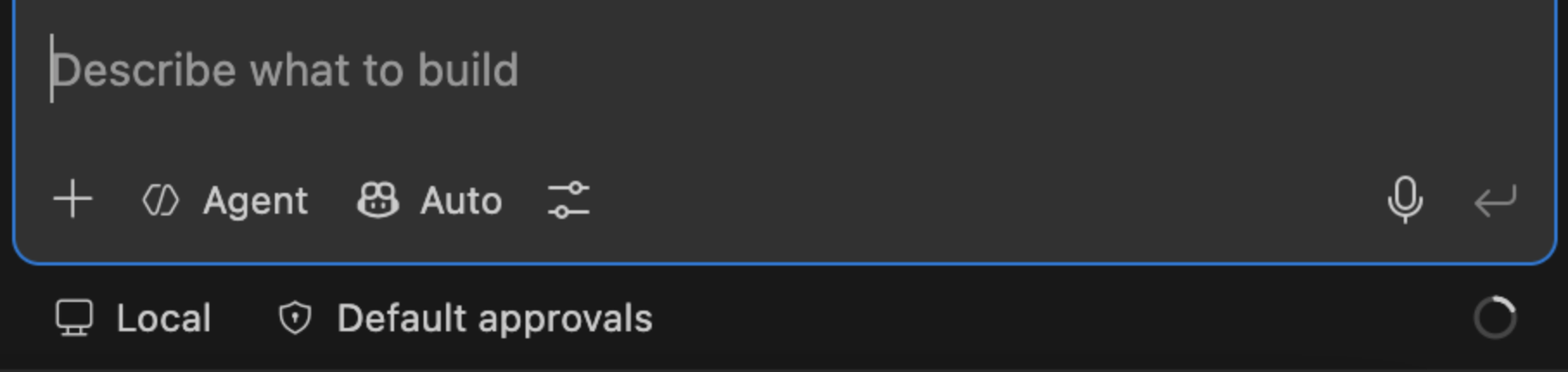
lamin track copilot says it can’t find the active session?
In VS Code, make sure “Copilot” is selected — not “Local” — in the mode picker below the chat input box. lamin track copilot can only see sessions that go through the “Copilot”; sessions run via “Local” aren’t visible to it.
Options:
lamin track [OPTIONS] COMMAND [ARGS]...

Options:
  --help  Show this message and exit.

Commands:
  claude   Start tracking a Claude Code session in LaminDB.
  copilot  Start tracking a GitHub Copilot session in LaminDB.
  cursor   Start or resume tracking a Cursor IDE Agent session in LaminDB.
→ Python/R alternative: track() and finish() for (non-shell) scripts or notebooks
finish
Finish a tracked session.
This can be a shell script run, a Claude Code, Copilot, or Cursor session.
Options:
lamin finish [OPTIONS]

Options:
  --help  Show this message and exit.
→ Python/R alternative: finish() for (non-shell) scripts or notebooks
Administer
settings
Manage development, cache, modules, branch, space, mount, and run settings.
Get or set the following settings:
dev-dir→ development directorydev_dircache-dir→ cache directorycache_dirmodules→ environment schema modulesmodulesbranch→ currentbranchspace→ currentspacemount→ read-only mounts of storage locations, used bylamin runto read inputs in placerun-where→ default place forlamin run(overridden by$LAMIN_RUN_WHEREand--where)
You can display your current settings by running: lamin info
Examples:
# dev-dir (created by lamin init or lamin connect <account/name> --here)
lamin settings dev-dir get
lamin settings dev-dir find .
# cache-dir
lamin settings cache-dir get
lamin settings cache-dir set /path/to/cache
lamin settings cache-dir clear
# modules
lamin settings modules get
lamin settings modules set bionty,pertdb
lamin settings modules unset
# branch
lamin settings branch get
lamin settings branch set main
# space
lamin settings space get
lamin settings space set all
# mount
lamin settings mount storage ./mnt
lamin settings mount path lamin://acme/data/artifact/key/my_file.parquet
lamin settings mount unset ./mnt
# run-where
lamin settings run-where get
lamin settings run-where set modal
lamin settings run-where unset
Options:
lamin settings [OPTIONS] COMMAND [ARGS]...

Options:
  --help  Show this message and exit.

Commands:
  cache-dir  Get, set, reset, or clear the cache directory.
  dev-dir    Get or find development directories.
  modules    Get or set environment schema modules.
  mount      Mount storage locations read-only via an installed FUSE...
  run-where  Get or set where `lamin run` runs by default.
→ Python/R alternative: dev_dir, cache_dir, modules, branch, and space
migrate
Manage database schema migrations.
Options:
lamin migrate [OPTIONS] COMMAND [ARGS]...

Options:
  --help  Show this message and exit.

Commands:
  create  Create a new migration.
  deploy  Deploy migrations.
  squash  Squash migrations.
io
Transfer, import, and export data.
Use lamin io sync to sync objects to the current database:
lamin io sync https://lamin.ai/laminlabs/lamindata/record/UrcIKR8v0ywim0pE
lamin io sync https://lamin.ai/laminlabs/lamindata/record/UrcIKR8v0ywim0pE --depth 1
lamin io sync record --uid UrcIKR8v0ywim0pE --from laminlabs/lamindata
lamin io sync artifact --key example_datasets/mini_immuno/dataset1.h5ad --from laminlabs/lamindata
→ Guide: Transfer & sync across databases
Options:
lamin io [OPTIONS] COMMAND [ARGS]...

Options:
  --help  Show this message and exit.

Commands:
  exportdb  Export registries to parquet files.
  importdb  Import registries from parquet files.
  snapshot  Create an SQLite snapshot of the current database.
  sync      Sync an object to the current database.
→ Python/R alternative: sync()
Use lamin io snapshot to create an SQLite snapshot of the current database:
lamin io snapshot
Use lamin io importdb to import data from parquet files:
lamin io importdb --input-dir path/to/parquet/files
Use lamin io exportdb to export data to parquet files:
lamin io exportdb --output-dir path/to/parquet/files
integrations
Use integrations.
Examples:
lamin integrations notion sync db7c1d2ec3a6495e859f8d21d533dd27
lamin integrations notion sync db7c1d2ec3a6495e859f8d21d533dd27 --depth 1 --apply
Options:
lamin integrations [OPTIONS] COMMAND [ARGS]...

Options:
  --help  Show this message and exit.

Commands:
  notion  Sync from Notion.
→ Python/R alternative: sync_objects_from_notion()
Authenticate
login
Log into the hub.
lamin login prompts for your API key unless you set it via environment variable LAMIN_API_KEY.
You can create your API key in your account settings on LaminHub (top right corner).
After authenticating once, you can re-authenticate and switch between accounts via lamin login myhandle.
Options:
lamin login [OPTIONS] [USER]

Options:
  --help  Show this message and exit.
→ Python/R alternative: login()
logout
Log out of the hub.
Options:
lamin logout [OPTIONS]

Options:
  --help  Show this message and exit.
Experimental
run
Run a script or executable, tracked as a run.
Arguments for the target go after --. Any lamin:// URI among them, or the
target itself, is replaced by a local path: read in place from a mounted storage
location if there is one (see lamin settings mount), otherwise from the cache.
lamin run train.py -- --data lamin://acme/data/artifact/key/train.parquet --epochs 3
lamin run samtools -- view -b lamin://acme/data/artifact/3TrLu3AbQx9dZq2K -o out.bam
lamin run --register-output out.bam align.sh -- --out out.bam
lamin run --where modal --project my_project my_script.py
lamin run --dry-run align.sh -- --out out.bam
URIs take two forms. The uid form matches nf-lamin; the key form accepts
space, branch and version qualifiers:
lamin://<owner>/<instance>/artifact/<uid>[/<subpath>]
lamin://<owner>/<instance>/artifact/key/<key>[/<subpath>][?space=&branch=&version=]
Resolved artifacts are linked as run inputs. The target receives
LAMIN_INITIATED_BY_RUN_UID, so a script calling ln.track() records its run as
a child of this one, plus LAMIN_INPUT_PATHS and LAMIN_MOUNTS (JSON) to
translate URIs it reads from elsewhere, e.g. config files.
The target’s --version output, when it has one, is recorded in
run.params["tool_version"], not on its (possibly reused) transform. For a
Python script, the interpreter’s pip freeze is additionally snapshotted and
linked as run.environment, mirroring what ln.track() does for its own
process.
Unlike inputs, which carry their own ?branch=&space= in the URI, the
transform/run/outputs otherwise inherit whatever branch/space the local machine
is pointed at; pass --branch/--space to make this explicit instead.
An output only registers if the target exits 0, and is uploaded or kept local
following the instance’s keep_artifacts_local setting; pass --upload-outputs
to force it for this run. Use --dry-run to preview all of this first.
Options:
lamin run [OPTIONS] TARGET

Options:
  --where [local|modal]   Where to run. Defaults to $LAMIN_RUN_WHERE, then
                          `lamin settings run-where`, then local.
  --project TEXT          A valid project name or uid to link the run to. On
                          Modal, also names the app.
  --register-output TEXT  Register a file the target writes as an output
                          artifact. Repeatable.
  --remount               Remount a storage location if it serves stale
                          metadata for an input.
  --image-url TEXT        Modal only: a URL to the base docker image.
  --packages TEXT         Modal only: a comma-separated list of additional
                          packages.
  --cpu FLOAT             Modal only: CPU configuration.
  --gpu TEXT              Modal only: the type of GPU (cuda images only).
  --branch TEXT           A branch name or uid for the transform, run and any
                          outputs. Defaults to the current local branch.
  --space TEXT            A space name or uid for the transform, run and any
                          outputs. Defaults to the current local space.
  --upload-outputs        Force outputs to upload even if the instance keeps
                          artifacts local by default.
  --dry-run               Report what would be linked as inputs and registered
                          as outputs, without executing the target or saving
                          anything. Local only.
  --help                  Show this message and exit.
→ Python/R alternative: no equivalent
hub
Query the hub API.
This is an EXPERIMENTAL feature.
Options:
lamin hub [OPTIONS] COMMAND [ARGS]...

Options:
  --help  Show this message and exit.

Metadata:
  schema      Show instance schema.
  statistics  Show size and table counts.

Reads:
  list  List objects.
  get   Get one object.

Mutations:
  insert  Insert objects.
  upsert  Insert or update objects.
  update  Update objects.
  delete  Delete objects.