Organize datasets  

This guide walks through organizing datasets using files & folders, database relationships, and versioned collections.
Via files & folders
You can use LaminDB like a file system. Similar to AWS S3, you organize artifacts into virtual folders using /-separated keys. To ingest a single file into a project1/ folder, you’d call:
artifact1 = ln.Artifact("./dataset.csv", key="project1/dataset1.csv").save()
For convenience, if you want to create an artifact for every file in a directory, use from_dir():
artifacts = ln.Artifact.from_dir("./project1/").save()
You can then query for all artifacts in the "./project1/" folder via:
artifacts = ln.Artifact.filter(key__startswith="project1/")
Unlike a regular file system, every artifact is versioned and comes with rich metadata.
What if I do not care about the metadata and version of every file in a folder?
In some cases a folder is the dataset and you don’t need fine-grained information for every file. In this scenario, save the entire directory as a single artifact:
ln.Artifact("./folder_abc", key="folder_abc").save()
Via relationships in the database
Annotating with projects
What if an artifact is relevant to multiple projects?
A dataset that’s in the project1/ folder cannot also reside in a project2/ folder.
You can solve this problem with the artifact.projects relationship that links the Project to Artifact:

Here is how to annotate one artifact with two projects:
project1 = ln.Project(name="Project 1").save()  # create project 1
project2 = ln.Project(name="Project 2").save()  # create project 2
artifact1.projects.add(project1, project2)      # annotate artifact1
This allows you to retrieve artifact1 by querying any project it belongs to:
artifacts_in_project1 = ln.Artifact.filter(projects=project1)
artifacts_in_project2 = ln.Artifact.filter(projects=project2)
Here, artifact1 is part of both query results.
Three additional advantages to using related registries rather than folder structures.
Projects can be richly annotated (e.g., with start/end dates, parent projects, or member roles).
You no longer need to rely on fragile file paths. If a folder is renamed, path-based retrieval breaks, but a project query by
uidwill always work.[1]You can run a constrained query or search against all projects in your database rather than trying to narrow a search to folder names.
Annotating with labels
You can annotate with other entity types, not just projects. LaminDB offers two main classes for this: Record for metadata records and ULabel for simple labels, which are both linked to artifacts:
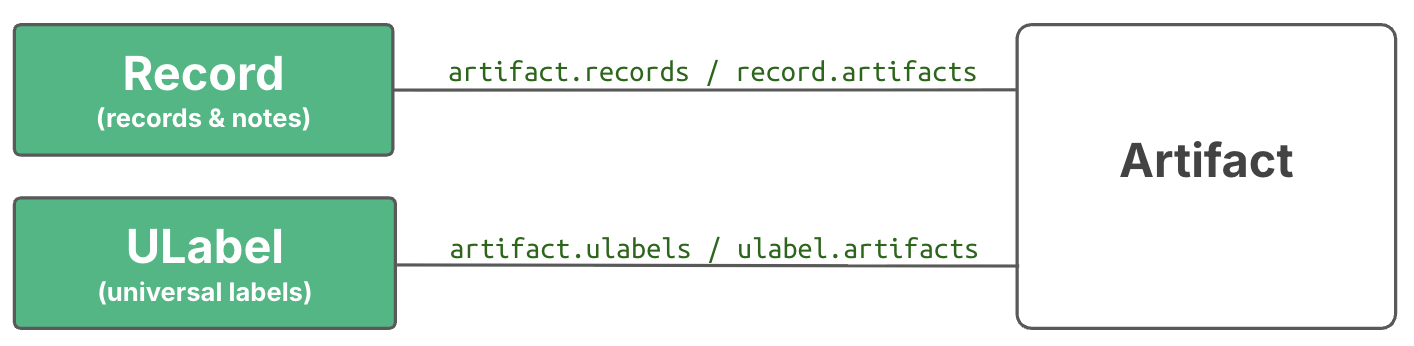
Here is how to annotate with a simple label:
ulabel1 = ln.ULabel(name="raw_data").save()  # create a ulabel
artifact1.ulabels.add(ulabel1)               # annotate artifact1
And here is how to create a samples registry and annotate the artifact with a sample:
samples_registry = ln.Record(                     # create a registry
    name="Samples",
    is_type=True
).save()
gc_content = ln.Feature(                     # create a feature
    name="gc_content",
    dtype=float
).save()
sample1 = ln.Record(                         # create a sample
    name="Sample 1",
    type=samples_registry,
    features={gc_content: 0.5}
).save()
artifact1.records.add(sample1)               # annotate artifact1
You can use records and ulabels alongside labels defined in modules such as bionty:
import bionty as bt

cell_type1 = bt.CellType.from_source(
    name="T cell"                            # create a cell type from a public ontology
).save()
artifact1.cell_types.add(cell_type1)         # annotate artifact1
Annotating with features
To annotate with non-categorical data types or to disambiguate categorical annotations, use Feature objects.
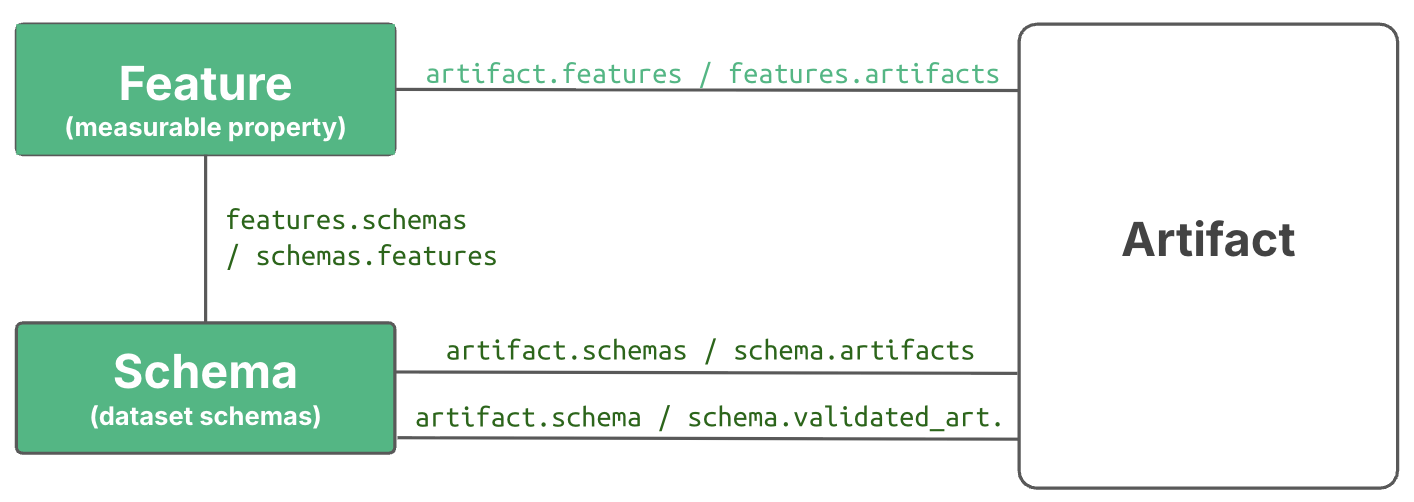
Here is how to define features and annotate an artifact with feature values:
experiments_registry = ln.Record.get(name="Experiments")  # retrieve the `Experiments` registry
gc_content = ln.Feature(name="gc_content", dtype=float).save()  # define a feature with dtype float
experiment = ln.Feature(name="experiment", dtype=experiments_registry).save()  # define a feature with dtype `Experiments`
artifact1.features.set_values({
    gc_content: 0.55,   # validated to be a float
    experiment: "Experiment 1",  # validated to exist in the `Experiments` registry
})
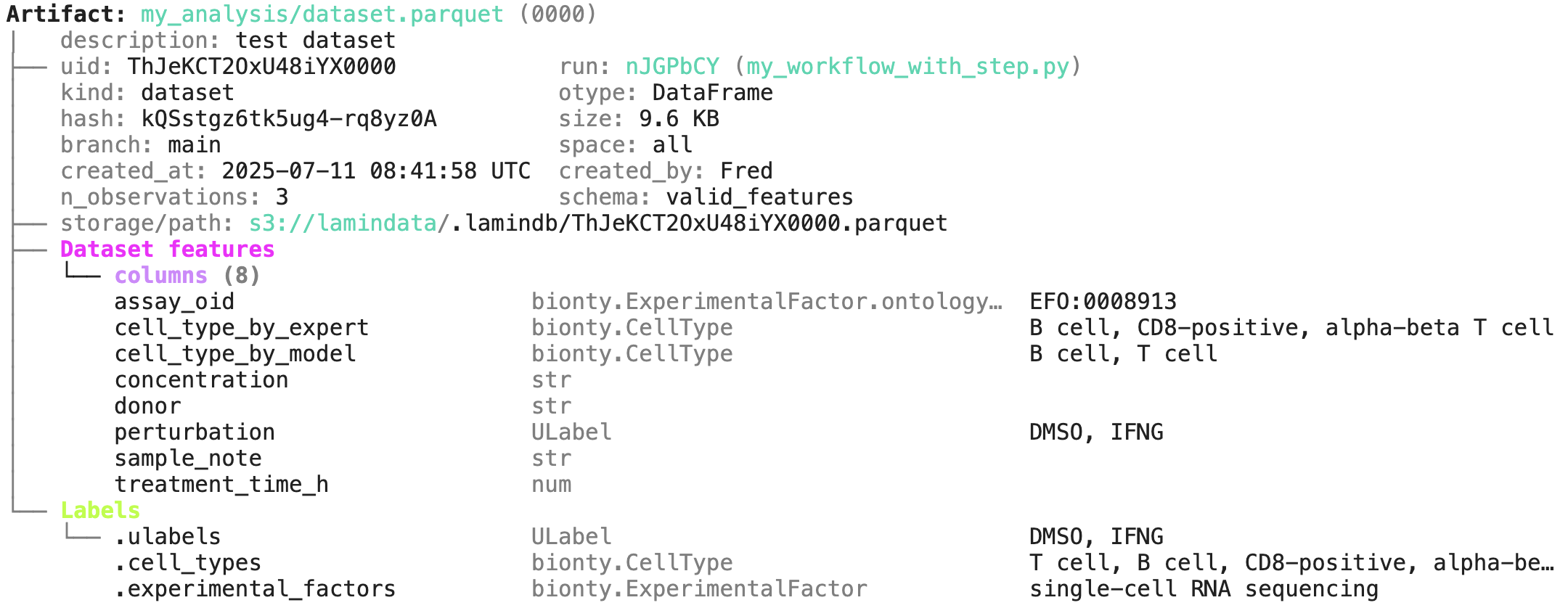
When you work with structured data formats like DataFrame or AnnData, you might want to validate their content. The easiest way validate a DataFrame is the built-in schema "valid_features". Beyond validating the content, it will also auto-annotate the resulting artifact:
# validate columns in the dataframe and map them on features
# auto-annotate with parsed metadata
ln.Artifact.from_dataframe(df, schema="valid_features").save()
Below is an example from the Tutorial illustrating how you get, e.g., cell type, treatment, and assay annotations based on a DataFrame’s content. You can read more on this in Curate datasets .
Annotating with data-lineage
When you call track() or decorate a function with flow(), you automatically annotate artifacts with Run and Transform objects.
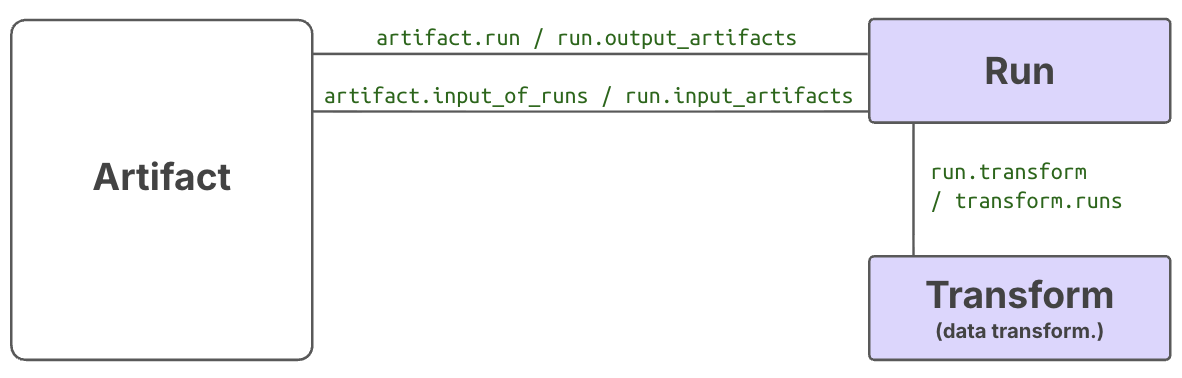
Here is how:
import lamindb as ln

ln.track()  # initiate a tracked notebook/script run

# your code automatically tracks inputs & outputs

ln.finish()  # mark run as finished, save execution report, source code & environment
Note that you can pass project to track() to auto-annotate all objects that are created in a run with a project label. Read more in Track notebooks, scripts & workflows .
Overview of auto-generated annotations
The Artifact registry has simple fields (such as description, created_at, size) and related fields (such as projects, created_by, storage). Many of these fields are automatically populated and you can use them to retrieve sets of artifacts.
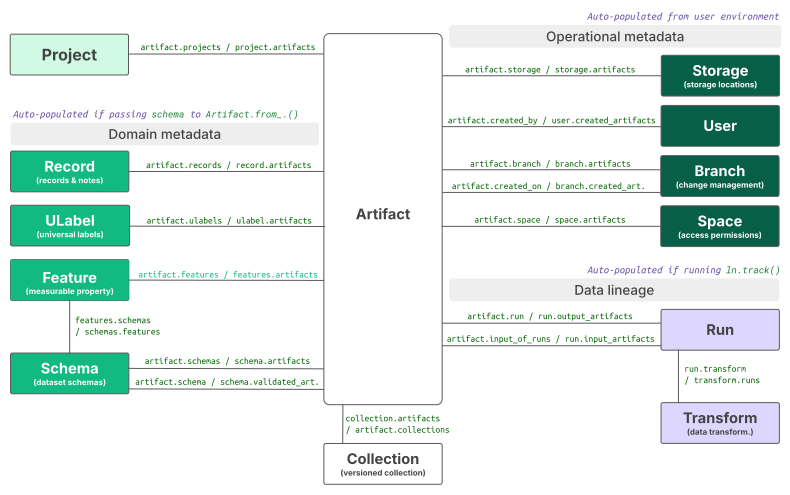
All other registries link to Artifact to provide context for finding, querying, validating, and managing artifacts. This is called dimensional modeling in data warehousing.[2]
Can you give me some example queries?
Here are examples leveraging auto-populated fields.
artifacts = ln.Artifact.filter(
    created_at__gt="2023-06-24",    # created after June 24th, 2023
    size__lt=1e9,                   # smaller than 1GB
    suffix=".parquet",              # with a .parquet suffix
    n_observations__gt=1000,        # with more than 1000 observations
    n_files__gt=1000,               # folder-like artifacts with more than 1000 files
    otype="DataFrame",              # that are DataFrames
    created_on__name="my-branch",   # created on a specific branch or environment
    created_by__handle="falexwolf", # created by user with handle falexwolf
    run=run,                        # created by a specific run
    transform__name="my-script.py", # created by a specific script/notebook
)
Versioned collections of artifacts
If you want to group artifacts by metadata and version the entire set, use Collection.
If you already know lakehouse tables (Iceberg, Delta Lake, DuckLake), this is the analogous concept: many files as one dataset, with a shared schema, ACID appends, and time travel. See Architecture.
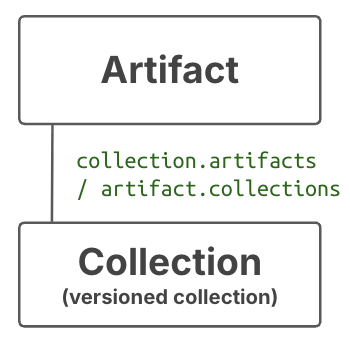
Unlike during annotation, you have to pass an entire group of artifacts to a Collection constructor:
collection = ln.Collection([artifact1, artifact2], key="my_data_release").save()
And unlike the folder-based or annotation-based sets of artifacts — which can change as artifacts are added or removed — a collection guarantees an exact, immutable set of artifacts.
Artifacts are versioned based on the hash of their content. Collections are versioned based on the top-level hash of their artifact hashes. If you use the append() method, a new version of the collection is created, and the old version is left unchanged:
collection_v2 = collection.append(artifact3)
If the artifacts share a schema, open() streams them as one table (Polars or PyArrow). See Collection.
While collections are indirectly annotated through the annotations of the artifacts they contain, you can also add collection-level annotations. Like artifacts, collections link to projects, runs, ulabels, records, and most other registries.