Preprocessing and clustering 3k PBMCs 
 

This guide demonstrates how to use lamindb to track data lineage and manage artifacts during a standard single-cell RNA-seq analysis workflow. Adapted from the Scanpy PBMC3k tutorial, it has additional code showing how to track the notebook’s execution and how to save the raw and the the final annotated dataset in your database.
We will process a dataset of 3k PBMCs from a Healthy Donor (freely available from 10x Genomics).
Note: To run examples, if you don’t have a LaminDB instance, create one:
lamin init --storage ./test-pbmc3k
Show code cell output
→ initialized database testuser1/test-pbmc3k in /home/runner/work/lamin-usecases/lamin-us
ecases/docs
Import modules:
import matplotlib.pyplot as plt
import pandas as pd
import scanpy as sc
import lamindb as ln
Show code cell output
→ connected lamindb: testuser1/test-pbmc3k
Track the notebook’s execution:
ln.track()
Show code cell output
→ created Transform('KS8ynlZyEvR50000', key='pbmc3k.ipynb'), started new Run('pKx5bLmFnaI36Miz') at 2026-10-21 07:42:00 UTC
• tip: to identify the notebook across renames, pass the uid: ln.track("KS8ynlZyEvR5")
Download and unpack the data:
from pathlib import Path
import tarfile
from urllib.request import Request, urlopen

data_dir = Path("data")
data_dir.mkdir(exist_ok=True)
archive_path = data_dir / "pbmc3k_filtered_gene_bc_matrices.tar.gz"
if not archive_path.exists():
    urls = [
        "https://cf.10xgenomics.com/samples/cell-exp/1.1.0/pbmc3k/pbmc3k_filtered_gene_bc_matrices.tar.gz",
        "https://cf.10xgenomics.com/samples/cell/pbmc3k/pbmc3k_filtered_gene_bc_matrices.tar.gz",
    ]
    for i, url in enumerate(urls):
        try:
            req = Request(url, headers={"User-Agent": "Mozilla/5.0"})
            with urlopen(req) as response, archive_path.open("wb") as f:
                f.write(response.read())
            break
        except Exception:
            if i == len(urls) - 1:
                raise
with tarfile.open(archive_path, "r:gz") as tar:
    tar.extractall(data_dir)
Show code cell output
/tmp/ipykernel_3453/2369541917.py:23: DeprecationWarning: Python 3.14 will, by default, filter extracted tar archives and reject files or modify their metadata. Use the filter argument to control this behavior.
  tar.extractall(data_dir)
Read in the count matrix into an AnnData object:
adata = sc.read_10x_mtx(
    "data/filtered_gene_bc_matrices/hg19/",  # the directory with the `.mtx` file
    var_names="gene_symbols",  # use gene symbols for the variable names (variables-axis index)
    cache=True,  # write a cache file for faster subsequent reading
)
adata
Show code cell output
AnnData object with n_obs × n_vars = 2700 × 32738
    var: 'gene_ids'
    layers: None (.X)
Save the AnnData object with the raw data:
ln.Artifact.from_anndata(adata, key="raw_pbmc3k.h5ad").save()
Show code cell output
Artifact(uid='FdV0joKFUvGxgW080000', key='raw_pbmc3k.h5ad', description=None, suffix='.h5ad', kind='dataset', otype='AnnData', size=21668016, hash='hfBxDonznuo69pau42XDlA', n_files=None, n_observations=2700, extra_data=None, branch_id=1, created_on_id=1, space_id=1, storage_id=1, run_id=1, schema_id=None, created_by_id=1, created_at=2026-10-21 07:42:01 UTC, is_locked=False, version_tag=None, is_latest=True)
Preprocessing
Load the raw dataset:
adata = ln.Artifact.get(key="raw_pbmc3k.h5ad").load()
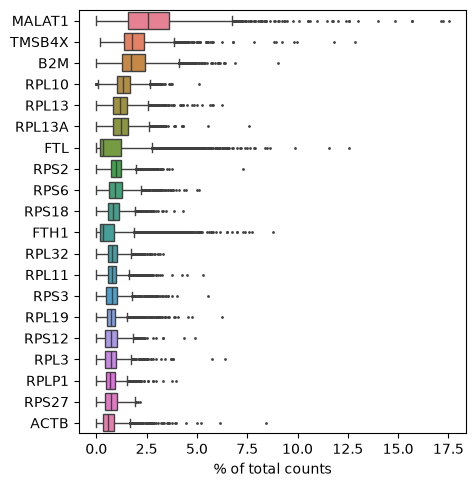
Show those genes that yield the highest fraction of counts in each single cell, across all cells:
sc.pl.highest_expr_genes(adata, n_top=20)
Show code cell output
Basic filtering:
sc.pp.filter_cells(adata, min_genes=200)
sc.pp.filter_genes(adata, min_cells=3)
adata
Show code cell output
AnnData object with n_obs × n_vars = 2700 × 13714
    obs: 'n_genes'
    var: 'gene_ids', 'n_cells'
    layers: None (.X)
Let’s assemble some information about mitochondrial genes, which are important for quality control:
# annotate the group of mitochondrial genes as "mt"
adata.var["mt"] = adata.var_names.str.startswith("MT-")
sc.pp.calculate_qc_metrics(adata, qc_vars=["mt"], percent_top=None, log1p=False, inplace=True)
A violin plot of some of the computed quality measures:
the number of genes expressed in the count matrix
the total counts per cell
the percentage of counts in mitochondrial genes
sc.pl.violin(
    adata,
    ["n_genes_by_counts", "total_counts", "pct_counts_mt"],
    jitter=0.4,
    multi_panel=True,
)
Show code cell output
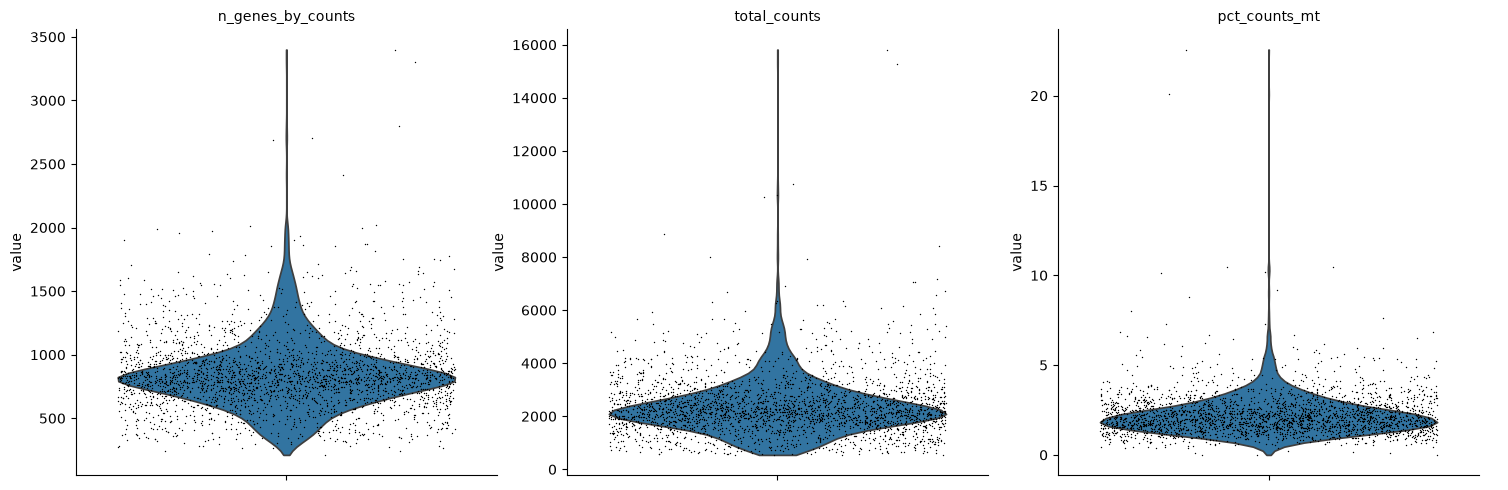
Remove cells that have too many mitochondrial genes expressed or too many total counts. Do the filtering by slicing the AnnData object:
adata = adata[
    (adata.obs.n_genes_by_counts < 2500) & (adata.obs.n_genes_by_counts > 200) & (adata.obs.pct_counts_mt < 5),
    :,
].copy()
adata.layers["counts"] = adata.X.copy()
adata
Show code cell output
AnnData object with n_obs × n_vars = 2638 × 13714
    obs: 'n_genes', 'n_genes_by_counts', 'total_counts', 'total_counts_mt', 'pct_counts_mt'
    var: 'gene_ids', 'n_cells', 'mt', 'n_cells_by_counts', 'mean_counts', 'pct_dropout_by_counts', 'total_counts'
    layers: None (.X), 'counts'
Total-count normalize (library-size correct) the data matrix $\mathbf{X}$ to 10,000 reads per cell, so that counts become comparable among cells:
sc.pp.normalize_total(adata, target_sum=1e4)
Logarithmize the data:
sc.pp.log1p(adata)
Identify highly-variable genes:
sc.pp.highly_variable_genes(
    adata,
    layer="counts",
    n_top_genes=2000,
    min_mean=0.0125,
    max_mean=3,
    min_disp=0.5,
    flavor="seurat_v3",
)
Scale each gene to unit variance. Clip values exceeding standard deviation 10.
adata.layers["scaled"] = adata.X.toarray(order='C')
sc.pp.regress_out(adata, ["total_counts", "pct_counts_mt"], layer="scaled")
sc.pp.scale(adata, max_value=10, layer="scaled")
Show code cell output
/opt/hostedtoolcache/Python/3.12.15/x64/lib/python3.12/site-packages/scanpy/preprocessing/_simple.py:660: NumbaPerformanceWarning: '@' is faster on contiguous arrays, called on (Array(float64, 1, 'A', False, aligned=True), Array(float64, 2, 'C', False, aligned=True))
  data[i] -= regressor[i] @ coeff
/opt/hostedtoolcache/Python/3.12.15/x64/lib/python3.12/site-packages/scanpy/preprocessing/_simple.py:660: NumbaPerformanceWarning: '@' is faster on contiguous arrays, called on (Array(float64, 1, 'A', False, aligned=True), Array(float64, 2, 'C', False, aligned=True))
  data[i] -= regressor[i] @ coeff
Principal component analysis
Reduce the dimensionality of the data by running principal component analysis (PCA), which reveals the main axes of variation and denoises the data.
sc.pp.pca(adata, layer="scaled", svd_solver="arpack")
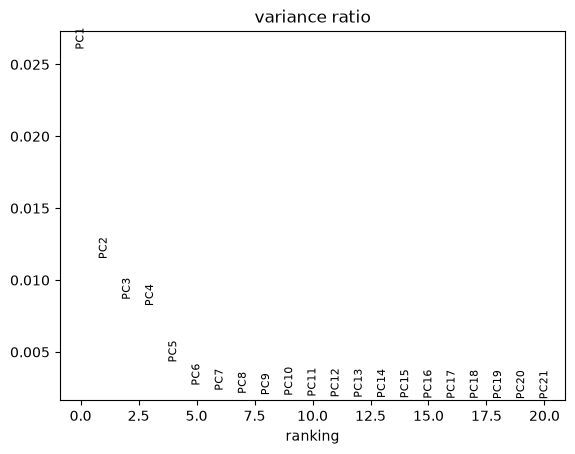
Let us inspect the contribution of single PCs to the total variance in the data. This gives us information about how many PCs we should consider in order to compute the neighborhood relations of cells, e.g. used in the clustering function sc.tl.louvain() or tSNE sc.tl.tsne().
sc.pl.pca_variance_ratio(adata, n_pcs=20)
Show code cell output
Computing the neighborhood graph
Compute the neighborhood graph of cells using the PCA representation of the data matrix.
sc.pp.neighbors(adata, n_neighbors=10, n_pcs=40)
Clustering the neighborhood graph
sc.tl.leiden(
    adata,
    resolution=0.7,
    random_state=0,
    flavor="igraph",
    n_iterations=2,
    directed=False,
)
adata.obs["leiden"] = adata.obs["leiden"].copy()
adata.uns["leiden"] = adata.uns["leiden"].copy()
Embedding the neighborhood graph in a UMAP
sc.tl.paga(adata)
sc.pl.paga(adata, plot=False)  # remove `plot=False` if you want to see the coarse-grained graph
sc.tl.umap(adata, init_pos='paga')
sc.tl.umap(adata)

adata.obsm["X_umap"] = adata.obsm["X_umap"].copy()
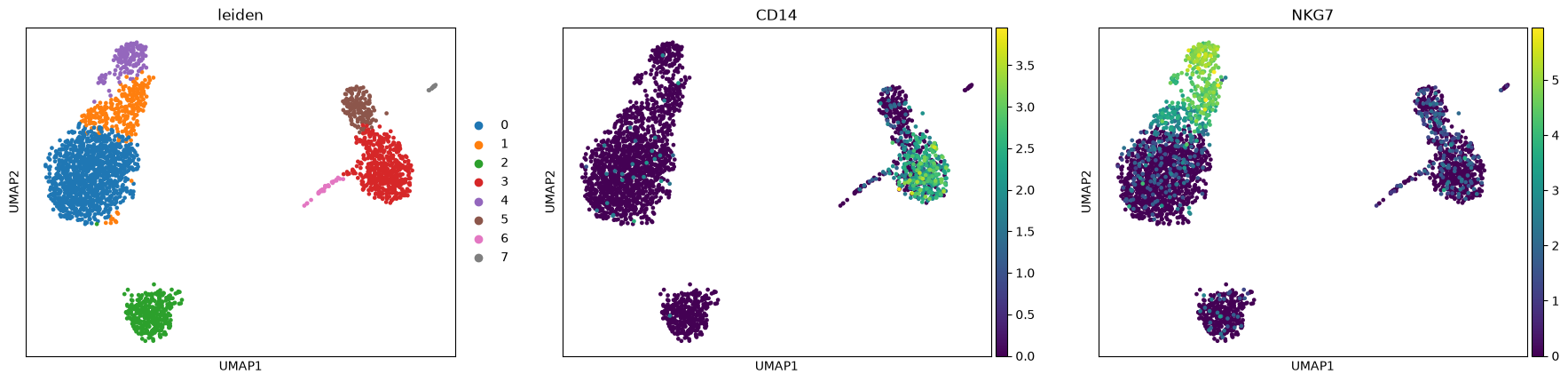
sc.pl.umap(adata, color=["leiden", "CD14", "NKG7"])
Show code cell output
Finding marker genes
Let us compute a ranking for the highly differential genes in each cluster.
sc.tl.rank_genes_groups(adata, "leiden", mask_var="highly_variable", method="wilcoxon")
sc.pl.rank_genes_groups(adata, n_genes=25, sharey=False)
Show code cell output
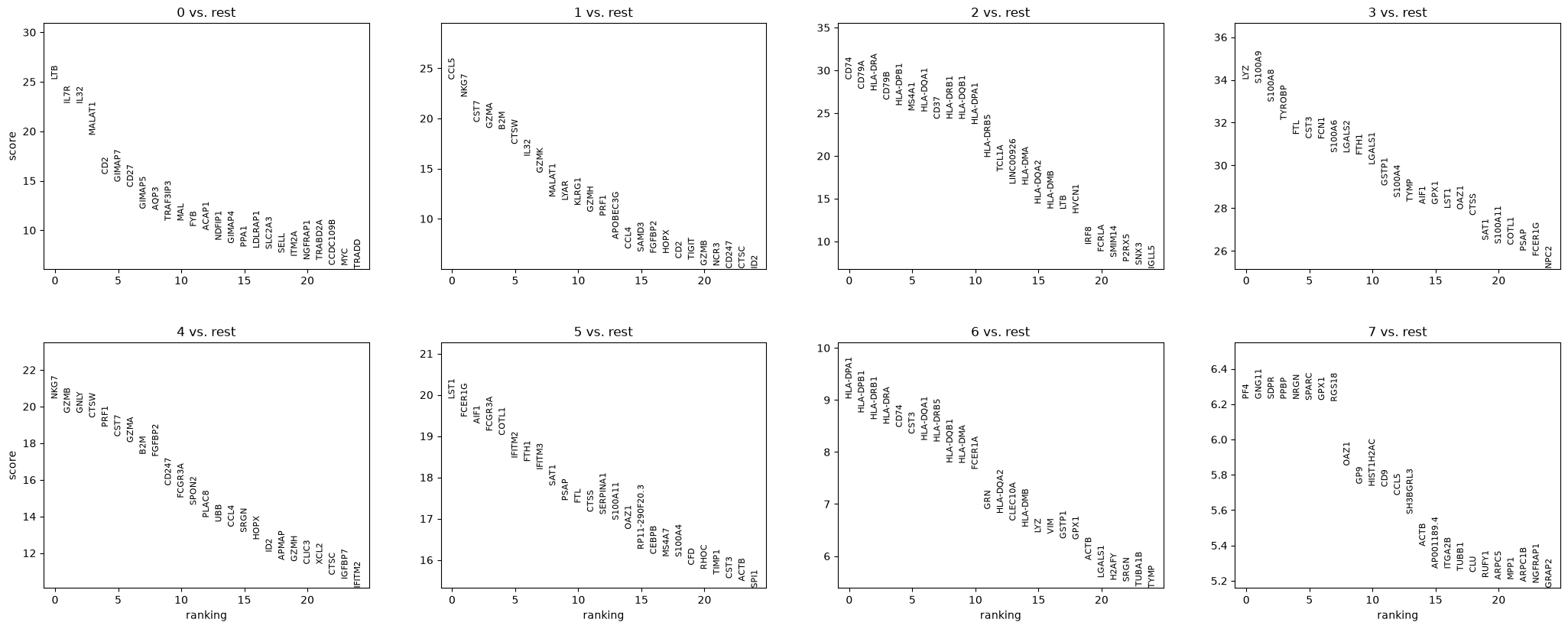
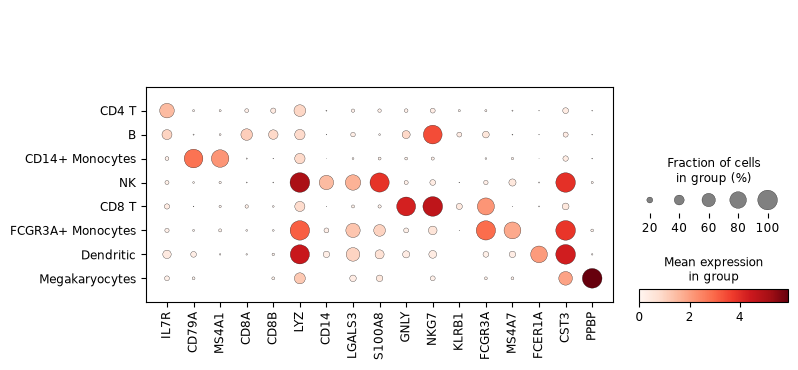
Most of these genes are found in the highly expressed genes with notable exceptions like CD8A (see the below dotplot).
Leiden Group |
Markers |
Cell Type |
|---|---|---|
0 |
IL7R |
CD4 T cells |
1 |
CD14, LYZ |
CD14+ Monocytes |
2 |
MS4A1 |
B cells |
3 |
CD8A |
CD8 T cells |
4 |
GNLY, NKG7 |
NK cells |
5 |
FCGR3A, MS4A7 |
FCGR3A+ Monocytes |
6 |
FCER1A, CST3 |
Dendritic Cells |
7 |
PPBP |
Megakaryocytes |
Let us also define a list of marker genes for later reference.
marker_genes = [
    *["IL7R", "CD79A", "MS4A1", "CD8A", "CD8B", "LYZ", "CD14"],
    *["LGALS3", "S100A8", "GNLY", "NKG7", "KLRB1"],
    *["FCGR3A", "MS4A7", "FCER1A", "CST3", "PPBP"],
]
Actually mark the cell types.
new_cluster_names = [
    "CD4 T",
    "B",
    "CD14+ Monocytes",
    "NK",
    "CD8 T",
    "FCGR3A+ Monocytes",
    "Dendritic",
    "Megakaryocytes",
]
adata.rename_categories("leiden", new_cluster_names)
adata.obs['cell_type']=adata.obs['leiden']
adata
Show code cell output
AnnData object with n_obs × n_vars = 2638 × 13714
    obs: 'n_genes', 'n_genes_by_counts', 'total_counts', 'total_counts_mt', 'pct_counts_mt', 'leiden', 'cell_type'
    var: 'gene_ids', 'n_cells', 'mt', 'n_cells_by_counts', 'mean_counts', 'pct_dropout_by_counts', 'total_counts', 'highly_variable', 'highly_variable_rank', 'means', 'variances', 'variances_norm', 'mean', 'std'
    uns: 'log1p', 'hvg', 'pca', 'neighbors', 'leiden', 'paga', 'leiden_sizes', 'umap', 'leiden_colors', 'rank_genes_groups'
    obsm: 'X_pca', 'X_umap'
    varm: 'PCs'
    obsp: 'distances', 'connectivities'
    layers: None (.X), 'counts', 'scaled'
Visualize the cell types in a UMAP
sc.pl.umap(adata, color="cell_type", legend_loc="on data", title="", frameon=False)
Show code cell output
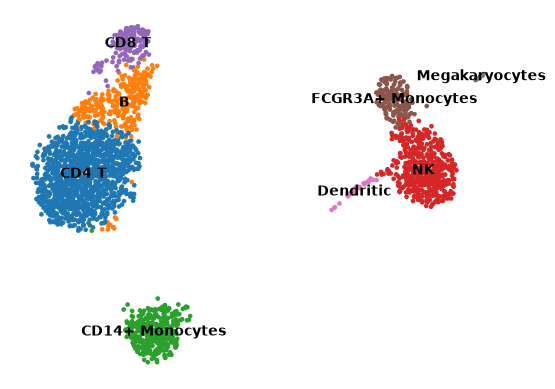
Now that we annotated the cell types, let us visualize the marker genes.
sc.pl.dotplot(adata, marker_genes, groupby="cell_type")
Show code cell output
Save the resulting AnnData object in LaminDB:
ln.Artifact.from_anndata(adata, key="result_pbmc3k.h5ad").save()
Show code cell output
Artifact(uid='80nYrvgqOHZVlsMj0000', key='result_pbmc3k.h5ad', description=None, suffix='.h5ad', kind='dataset', otype='AnnData', size=190956830, hash='7kSSMlmOI4XFDBZA7uE86J', n_files=None, n_observations=2638, extra_data=None, branch_id=1, created_on_id=1, space_id=1, storage_id=1, run_id=1, schema_id=None, created_by_id=1, created_at=2026-10-21 07:42:42 UTC, is_locked=False, version_tag=None, is_latest=True)
ln.finish() marks the successful completion of the current script or notebook run in LaminDB, finalizing its execution state and saving the source code to the database for reproducibility.
ln.finish()
Show code cell output
→ finished Run('pKx5bLmFnaI36Miz') after 43s at 2026-10-21 07:42:43 UTC