Concatenate datasets to a single array store 
 

In the previous notebooks, we’ve seen how to incrementally create a collection of scRNA-seq datasets and train models on it.
Sometimes we want to concatenate all datasets into one big array to speed up ad-hoc queries for slices for arbitrary metadata.
This is also what CELLxGENE does to create Census: a number of .h5ad files are concatenated to give rise to a single tiledbsoma array store (CELLxGENE).
import lamindb as ln
import pandas as pd
import scanpy as sc
import tiledbsoma.io
from functools import reduce

ln.track()
Show code cell output
→ connected lamindb: testuser1/test-scrna
→ created Transform('ioXU8wdNMoXi0000', key='scrna-tiledbsoma.ipynb'), started new Run('tQT9pFBg6Y5JutV0') at 2026-10-21 07:44:20 UTC
• tip: to identify the notebook across renames, pass the uid: ln.track("ioXU8wdNMoXi")
Query the collection of h5ad files that we’d like to concatenate into a single array.
collection = ln.Collection.get(key="scrna/collection1")
collection.describe()
Show code cell output
Collection: scrna/collection1 (0001)
└── uid: DFM7E8c3rKEpf7ch0001            run: P0TVII6 (scrna2.ipynb)
    branch: main                         space: all
    created_at: 2026-10-21 07:43:55 UTC  created_by: testuser1
Prepare the AnnData objects
To concatenate the AnnData objects into a single tiledbsoma.Experiment, they need to have the same .var and .obs columns.
# load a number of AnnData objects that's small enough to fit into memory
adatas = [artifact.load() for artifact in collection.ordered_artifacts]

# compute the intersection of columns for these objects
var_columns = reduce(
    pd.Index.intersection, [adata.var.columns for adata in adatas]
)  # this only affects metadata columns of features (say, gene annotations)
var_raw_columns = reduce(
    pd.Index.intersection, [adata.raw.var.columns for adata in adatas]
)
obs_columns = reduce(
    pd.Index.intersection, [adata.obs.columns for adata in adatas]
)  # this actually subsets features (dataset dimensions)
Prepare the AnnData objects for concatenation. Prepare id fields, sanitize index names, intersect columns, drop .obsp, .uns and columns that aren’t part of the intersection.
for i, adata in enumerate(adatas):
    del adata.obsp  # not supported by tiledbsoma
    del adata.uns  # not supported by tiledbsoma

    adata.obs = adata.obs.filter(obs_columns)  # filter columns to intersection
    adata.obs["obs_id"] = (
        adata.obs.index
    )  # prepare a column for tiledbsoma to use as an index
    adata.obs["dataset"] = i
    adata.obs.index.name = None

    adata.var = adata.var.filter(var_columns)  # filter columns to intersection
    adata.var["var_id"] = adata.var.index
    adata.var.index.name = None

    drop_raw_var_columns = adata.raw.var.columns.difference(var_raw_columns)
    adata.raw.var.drop(columns=drop_raw_var_columns, inplace=True)
    adata.raw.var["var_id"] = adata.raw.var.index
    adata.raw.var.index.name = None
Create the array store
Save the AnnData objects in one array store referenced by an Artifact.
soma_artifact = ln.integrations.save_tiledbsoma_experiment(
    adatas,
    description="tiledbsoma experiment",
    measurement_name="RNA",
    obs_id_name="obs_id",
    var_id_name="var_id",
    append_obsm_varm=True,
)
Show code cell output
→ writing the tiledbsoma store to /home/runner/work/lamin-usecases/lamin-usecases/docs/test-scrna/.lamindb/ahT6K4lRuFlJnNwF.tiledbsoma
Note
Provenance is tracked by writing the current run.uid to tiledbsoma.Experiment.obs as lamin_run_uid.
If you know tiledbsoma API, then note that save_tiledbsoma_experiment() abstracts over both tiledbsoma.io.register_anndatas and tiledbsoma.io.from_anndata.
Query the array store
Here we query the obs from the array store.
with soma_artifact.open() as soma_store:
    obs = soma_store["obs"]
    var = soma_store["ms"]["RNA"]["var"]

    obs_columns_store = obs.schema.names
    var_columns_store = var.schema.names

    obs_store_df = obs.read().concat().to_pandas()

    display(obs_store_df)
Show code cell output
| soma_joinid | cell_type | obs_id | dataset | lamin_run_uid | |
|---|---|---|---|---|---|
| 0 | 0 | classical monocyte | CZINY-0109_CTGGTCTAGTCTGTAC | 0 | tQT9pFBg6Y5JutV0 |
| 1 | 1 | T follicular helper cell | CZI-IA10244332+CZI-IA10244434_CCTTCGACATACTCTT | 0 | tQT9pFBg6Y5JutV0 |
| 2 | 2 | memory B cell | Pan_T7935491_CTGGTCTGTACATGTC | 0 | tQT9pFBg6Y5JutV0 |
| 3 | 3 | alveolar macrophage | Pan_T7980367_GGGCATCCAGGTGGAT | 0 | tQT9pFBg6Y5JutV0 |
| 4 | 4 | naive thymus-derived CD4-positive, alpha-beta ... | Pan_T7935494_ATCATGGTCTACCTGC | 0 | tQT9pFBg6Y5JutV0 |
| ... | ... | ... | ... | ... | ... |
| 1713 | 1713 | CD4-positive, CD25-positive, alpha-beta regula... | CAGACAACAAAACG-7 | 1 | tQT9pFBg6Y5JutV0 |
| 1714 | 1714 | effector memory CD45RA-positive, alpha-beta T ... | ACAGTGTGTACTGG-3 | 1 | tQT9pFBg6Y5JutV0 |
| 1715 | 1715 | CD4-positive, CD25-positive, alpha-beta regula... | GAGGGTGACCTATT-1 | 1 | tQT9pFBg6Y5JutV0 |
| 1716 | 1716 | CD56-positive, CD161-positive immature natural... | AGTAATTGGCTTAG-3 | 1 | tQT9pFBg6Y5JutV0 |
| 1717 | 1717 | CD34-positive, CD56-positive, CD117-positive c... | AATGAGGATGGTTG-4 | 1 | tQT9pFBg6Y5JutV0 |
1718 rows × 5 columns
Append to the array store
Prepare a new AnnData object to be appended to the store.
ln.core.datasets.anndata_with_obs().write_h5ad("adata_to_append.h5ad")
lamin save adata_to_append.h5ad --description "adata to append"
Show code cell output
→ connected lamindb: testuser1/test-scrna
→ saved: Artifact(uid='FeTDTlTKpZKYvK5j0000', key=None, description='adata to append', su
ffix='.h5ad', kind=None, otype='AnnData', size=46992, hash='SS1MhYp1_R4RM3y5DhxcVg', n_files=None, n
_observations=None, extra_data=None, branch_id=1, created_on_id=1, space_id=1, storage_id=1, run_id=
None, schema_id=None, created_by_id=1, created_at=2026-10-21 07:44:27 UTC, is_locked=False, version_
tag=None, is_latest=True)
→ storage path: /home/runner/work/lamin-usecases/lamin-usecases/docs/test-scrna/.lamindb/
FeTDTlTKpZKYvK5j0000.h5ad
adata = ln.Artifact.filter(description="adata to append").one().load()

adata.obs_names_make_unique()
adata.var_names_make_unique()

adata.obs["obs_id"] = adata.obs.index
adata.var["var_id"] = adata.var.index

adata.obs["dataset"] = obs_store_df["dataset"].max()

obs_columns_same = [
    obs_col for obs_col in adata.obs.columns if obs_col in obs_columns_store
]
adata.obs = adata.obs[obs_columns_same]

var_columns_same = [
    var_col for var_col in adata.var.columns if var_col in var_columns_store
]
adata.var = adata.var[var_columns_same]

adata.write_h5ad("adata_to_append.h5ad")
Show code cell output
/opt/hostedtoolcache/Python/3.12.15/x64/lib/python3.12/site-packages/anndata/_core/anndata.py:1884: UserWarning: Variable names are not unique. To make them unique, call `.var_names_make_unique`.
  utils.warn_names_duplicates("var")
Append the AnnData object from disk by revising soma_artifact.
soma_artifact = ln.integrations.save_tiledbsoma_experiment(
    ["adata_to_append.h5ad"],
    revises=soma_artifact,
    measurement_name="RNA",
    obs_id_name="obs_id",
    var_id_name="var_id",
)
Show code cell output
→ writing the tiledbsoma store to /home/runner/work/lamin-usecases/lamin-usecases/docs/test-scrna/.lamindb/ahT6K4lRuFlJnNwF.tiledbsoma
Update the array store
Add a new embedding to the existing array store.
# read the data matrix
with soma_artifact.open() as soma_store:
    ms_rna = soma_store["ms"]["RNA"]
    n_obs = len(soma_store["obs"])
    n_var = len(ms_rna["var"])
    X = ms_rna["X"]["data"].read().coos((n_obs, n_var)).concat().to_scipy().tocsr()

# calculate PCA embedding from the queried `X`
pca_array = sc.pp.pca(X, n_comps=2)
Open the array store in write mode and add PCA.
with soma_artifact.open(mode="w") as soma_store:
    tiledbsoma.io.add_matrix_to_collection(
        exp=soma_store,
        measurement_name="RNA",
        collection_name="obsm",
        matrix_name="pca",
        matrix_data=pca_array,
    )
See array store mutations
During the append-to and update operations, the data in the array store was changed. LaminDB automatically tracks these revisions recording the number of objects, hashes, and provenance.
soma_artifact.versions.to_dataframe()
Show code cell output
| uid | key | description | suffix | kind | otype | size | hash | n_files | n_observations | ... | is_latest | is_locked | created_at | branch_id | created_on_id | space_id | storage_id | run_id | schema_id | created_by_id | |
|---|---|---|---|---|---|---|---|---|---|---|---|---|---|---|---|---|---|---|---|---|---|
| id | |||||||||||||||||||||
| 9 | ahT6K4lRuFlJnNwF0002 | None | tiledbsoma experiment | .tiledbsoma | None | None | 15117217 | Fz3YFFPGJgWJjtZd_C9tpQ | 182 | NaN | ... | True | False | 2026-10-21 07:44:29.088000+00:00 | 1 | 1 | 1 | 1 | 6 | None | 1 |
| 8 | ahT6K4lRuFlJnNwF0001 | None | tiledbsoma experiment | .tiledbsoma | None | tiledbsoma | 15096556 | AElB7xWNbLNgdJcSq9rVQg | 174 | 1758.0 | ... | False | False | 2026-10-21 07:44:28.123000+00:00 | 1 | 1 | 1 | 1 | 6 | None | 1 |
| 6 | ahT6K4lRuFlJnNwF0000 | None | tiledbsoma experiment | .tiledbsoma | None | tiledbsoma | 15083376 | Rl5KAkl5CN07jvxAbszlNw | 146 | 1718.0 | ... | False | False | 2026-10-21 07:44:25.153000+00:00 | 1 | 1 | 1 | 1 | 6 | None | 1 |
3 rows × 22 columns
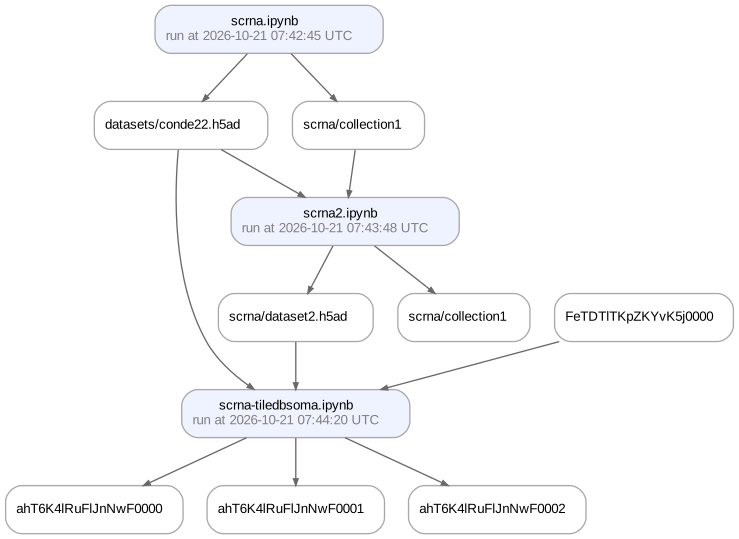
View lineage of the array store
Check the generating flow of the array store.
soma_artifact.view_lineage()
Show code cell output
Note
For the underlying API, see the tiledbsoma documentation.